So you've just invested in a new gaming and work PC—exciting, right? But here's the thing: buying a powerful computer is only half the battle. What really matters is how you set it up. Whether you're a content creator working from a cozy Melbourne café or a competitive gamer chasing high frame rates from home, the way you configure your system will directly impact your productivity, gameplay experience, and overall satisfaction. Many people make the mistake of simply plugging in their monitor, keyboard, and mouse without considering the bigger picture. They miss out on crucial optimizations that could transform their computing experience. In this guide, we'll walk you through everything you need to know to create the perfect PC setup Melbourne professionals and gamers rely on—one that balances raw performance with ergonomic comfort and aesthetic appeal.
Melbourne: Where Tech Meets Lifestyle
Melbourne is Australia's undisputed tech hub, home to thriving startup ecosystems, game development studios, and creative agencies. The city's culture of innovation means thousands of professionals and gamers are building powerful workstations right here in Victoria. Whether you're working in the CBD or gaming in the suburbs, Melburnians understand the importance of having a setup that works as hard as they do.
Building Your Foundation: Hardware Considerations
Selecting the Right Components for Dual-Purpose Computing
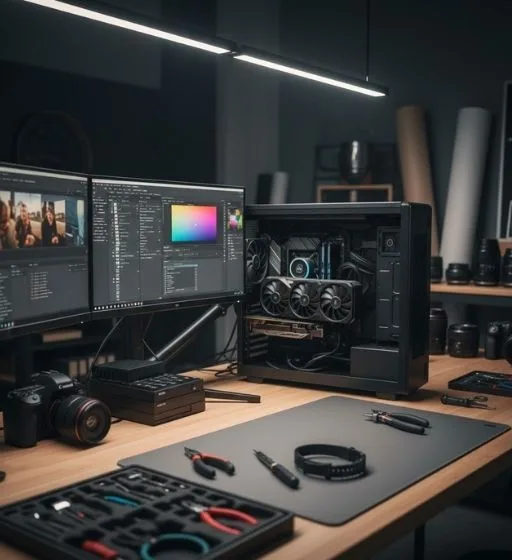
When optimizing your computer setup in Melbourne, the first step is understanding your specific needs. Gaming demands high-end graphics cards and fast processors, while professional work often requires multiple monitors, ample RAM, and reliable storage. The good news? You can absolutely build a machine that excels at both.
Start with your processor. If you're planning to stream while gaming or run resource-intensive applications like video editing software and games simultaneously, aim for at least an 8-core CPU. For those focusing primarily on gaming, a powerful quad-core processor will handle most modern titles beautifully. Next, consider your graphics card. This is where gaming performance lives. Invest in a GPU that matches your monitor's resolution and refresh rate—there's no point buying a cutting-edge 4K card if your monitor only supports 1080p at 60Hz.
RAM is equally crucial. While 16GB remains the sweet spot for most users, content creators and serious multitaskers should consider 32GB. Your storage setup deserves attention too. An SSD for your operating system and frequently-used applications ensures lightning-fast boot times and load speeds, while additional SATA drives can handle your media library and archives.
Monitor and Display Strategy
Your monitor is arguably the most important peripheral for daily enjoyment. For a hybrid gaming and work setup, consider a 27-inch display with a 144Hz refresh rate and IPS panel. This size offers excellent screen real estate for productivity tasks while delivering smooth gaming performance. If your budget allows, a dual-monitor configuration elevates your workflow significantly—one monitor for applications and communication, another for your primary work or gaming.
Color accuracy matters if you're doing creative work. Look for monitors with 99% sRGB coverage and factory calibration. Gamers, meanwhile, should prioritize response time (under 5ms is ideal) and refresh rate to minimize input lag.
Ergonomics and Comfort: The Often-Overlooked Essential
You can have the most powerful PC setup in Melbourne, but if you're uncomfortable, you'll never reach your potential. Ergonomics isn't just about feeling good—it directly impacts your performance and health.
Invest in a quality gaming or ergonomic chair that supports your lower back. You'll spend hours sitting, and poor posture leads to fatigue and reduced focus. Your desk height should allow your elbows to sit at roughly 90 degrees when typing. Your monitor should be at eye level, about an arm's length away—this prevents neck strain during those marathon gaming sessions or work days.
Keyboard and mouse deserve consideration too. Mechanical keyboards have become popular among both gamers and typists for their tactile feedback and durability. For mice, ergonomic designs reduce wrist strain, while high DPI sensors benefit competitive gamers. Don't skimp on these peripherals; they're worth the investment.
Software Optimization: Unleashing Your Hardware's Potential
Having excellent hardware means nothing if your software isn't optimized. This is where many people fall short.
Start by keeping your operating system and drivers updated. GPU manufacturers regularly release driver updates that improve gaming performance and stability. Missing these updates is leaving performance on the table. Next, disable unnecessary background applications. Services running in the background consume CPU resources and RAM, degrading both gaming and work performance.
For gaming, adjust your in-game graphics settings based on your target frame rate. You don't need maximum graphics if it drops your performance below 60 FPS. Most gamers find 100+ FPS at high settings far more enjoyable than 40 FPS at ultra settings. Experiment to find your sweet spot.
Install quality antivirus and anti-malware software. Malware silently consumes resources and can cripple performance. Windows Defender provides decent baseline protection, but third-party options offer enhanced security.
Creating Your Ideal Work Environment
Whether you're in a Melbourne home office or preparing a portable setup for co-working spaces, the environment matters tremendously. Good lighting reduces eye strain—consider a desk lamp with adjustable color temperature. A clean, organized workspace boosts focus and productivity. Cable management might seem superficial, but it reduces clutter and makes upgrades easier down the line.
Acoustics shouldn't be forgotten either. A good headset or gaming headphones serves dual purposes: immersion during gaming and professional audio during work calls. Noise-canceling capabilities are invaluable if you're working in shared spaces.
Network Optimization for Competitive Gaming and Remote Work
Both gamers and remote workers need reliable, low-latency internet. If possible, use a wired Ethernet connection rather than Wi-Fi. The difference is genuinely noticeable in online games and video conferencing. If wireless is your only option, position your router centrally and away from obstacles.
Consider your internet provider's speeds. Most Melbourne ISPs offer gigabit connections—ensure your plan actually supports the speeds you're paying for. Test your connection regularly using tools like Speedtest to verify you're getting what you paid for.
Backup and Data Protection
Nothing ruins a gaming and work setup faster than losing important files. Implement a robust backup strategy. Cloud storage services like Google Drive or Dropbox automatically sync your work files. For larger media libraries, external hard drives or NAS systems provide secure storage. Automate your backups so you never have to think about them.
The Final Touch: Aesthetics and Personal Expression
Your PC setup should reflect your personality. RGB lighting, cable management, and custom cases are more than just eye candy—they make your workspace feel personal and motivating. Many Melbourne creators and gamers take pride in their setups, using them as backgrounds for streams and videos.
Conclusion
Optimizing your new PC setup for gaming and work in Melbourne doesn't require breaking the bank—it requires thoughtful planning and attention to detail. By carefully selecting hardware components, prioritizing ergonomics, optimizing your software, and maintaining your system, you'll create a computing environment that serves both your gaming ambitions and professional goals. Whether you're streaming content, developing software, designing graphics, or chasing esports glory, a well-optimized PC setup Melbourne gives you the foundation to excel. Start implementing these recommendations today, and you'll be amazed at the difference they make to your daily computing experience.