Since software is updated constantly, releasing changes without properly separated environments risks breaking things for live users, leaking sensitive data, or disrupting core business functions. Software deployment environments give developers, testers, and business stakeholders controlled stages to validate an application before it reaches customers. Within DevOps and CI/CD practices, these environments help teams catch bugs earlier, strengthen security compliance, protect production systems, cut down on failed deployments, and ship updates more quickly and safely - a need shared by startups pushing weekly updates and enterprises running mission-critical systems.
Why Separate Environments Matter
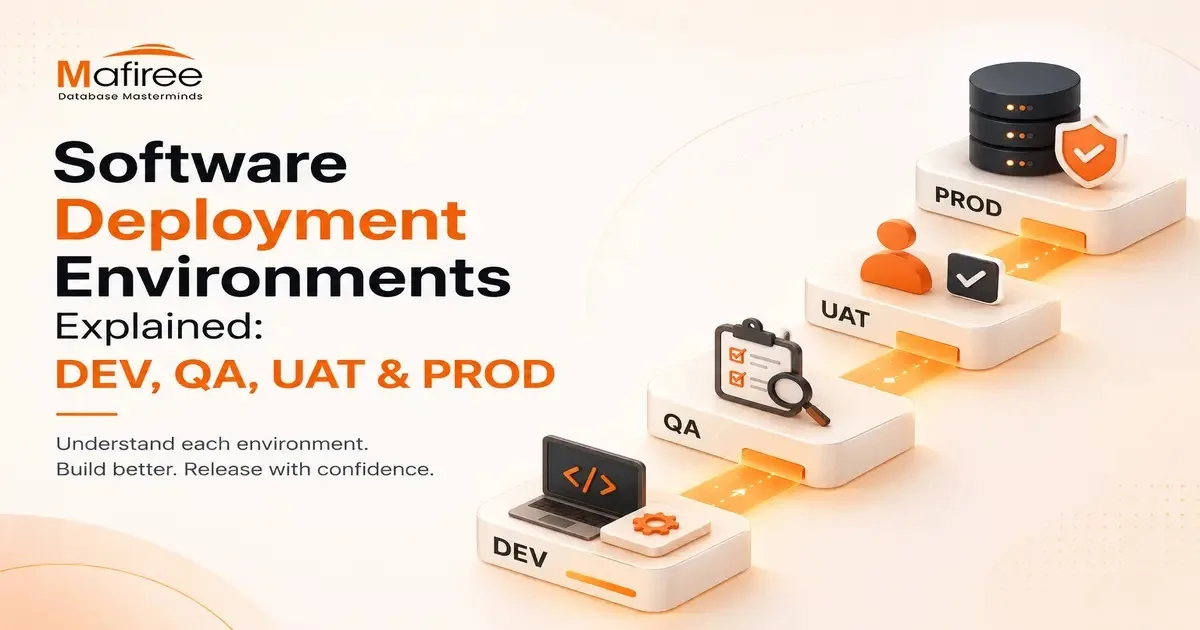
Every application moves through a sequence of distinct stages before reaching end users: DEV → QA → UAT → PROD. Far from being an unnecessary process, this separation is what allows teams to move quickly without putting real users at risk.
Development (DEV)
DEV is where coding, feature-building, and initial testing happen. It's a fast-moving space where stability takes a back seat to experimentation - developers constantly add features, fix issues, and test how components integrate. To mirror application behavior without needing full infrastructure, teams typically rely on local tools like Docker, local databases, Minikube (a lightweight Kubernetes setup), virtual machines, and local API servers.
QA / Test Environment
Here, the priority shifts to confirming the software works correctly before it reaches business users. QA engineers run functional, regression, API, security, performance, and automated tests to verify new features work properly and that recent changes haven't broken existing functionality.
UAT (User Acceptance Testing) / Staging
UAT is the last checkpoint before production. This environment is built to closely mirror production - matching configurations, database structures, load balancers, security policies, and network setup - so teams can catch issues that earlier stages might miss. Unlike QA, which is technically focused, UAT centers on business validation: stakeholders, product owners, and end users check whether the application supports real workflows like order processing, registration, payments, reporting, and approvals.
Production (PROD)
This is the live environment serving actual users, so reliability, security, performance, and availability take top priority since problems here directly affect customers and business operations. Production infrastructure typically includes auto-scaling, load balancers, backups, monitoring dashboards, security tools, and incident response systems. To limit risk when rolling out changes, teams use techniques such as Blue-Green Deployments, Canary Releases, Rolling Updates, and Feature Flags. Because failures can cause revenue loss, reputational harm, security breaches, or compliance issues, production releases go through strict change management involving approvals, rollback plans, and close monitoring.
Mafiree's Deployment Flow Example
Mafiree illustrates its own process using a checkout feature: developers build and test it locally in DEV; QA engineers verify payment flows, API behavior, and security in QA; business teams confirm the checkout experience works for customers in UAT; and finally, the feature ships to live users through a controlled release in PROD. This staged approach catches problems before customers ever encounter them.
Security Practices or Software deployment environments dev qa uat & prod github
Recommended safeguards include using separate credentials per environment, never using production data in DEV, masking sensitive customer data, restricting production access, enabling logging and monitoring, applying Infrastructure as Code, and using role-based access control. Security tightens progressively as code moves closer to production.
Common Pipeline Challenges
Teams often run into configuration drift between environments, inconsistent test data, failed deployments, dependency mismatches, weak rollback planning, and slow testing cycles — issues that automation and solid DevOps practices help resolve.
Staging vs. UAT
Staging is technical in focus, used by developers and testers to catch bugs and rehearse releases through smoke tests. UAT is business-focused, used by clients, product owners, and analysts to confirm real-world scenarios work as intended. Once UAT is signed off, the release moves to production.
Environment Comparison (DEV vs SIT vs UAT vs PROD)
The stages differ across stability (low to highest), data type (synthetic to live), users (developers to end users), deployment frequency (every commit to controlled), risk (high to zero), monitoring (minimal to 24/7), and configuration (flexible to strict).
Conclusion
Separating development, testing, validation, and production environments helps organizations lower deployment risk, boost software quality, safeguard customer data, speed up releases, and maintain business continuity - making well-managed environments a core foundation of modern software engineering as DevOps and cloud-native practices continue to evolve.