If you are comparing a custom CRM with another three years of Salesforce or HubSpot licensing, the useful number is not the monthly subscription alone. You need to compare implementation, customization, integrations, migration, and maintenance on both sides of the decision.
Quick Answer — 2026 CRM Cost Summary

Salesforce and HubSpot prices are per user per month at published 2026 rates, billed annually unless noted. Both exclude implementation, consulting, migrations, add-ons and integrations. Custom CRM ranges are illustrative 2026 planning figures — actual cost depends on scope. Vendor pricing changes frequently. Always verify at official pricing pages before budgeting.
Need a custom CRM estimate based on your actual workflow? → Get a Custom CRM Estimate from Primocys →
Custom CRM development is a broad category. It can mean a contact list with a sales pipeline, or a multi-department platform connected to accounting, telephony, ERP, and customer portals. Salesforce and HubSpot are genuinely excellent products — the case for custom CRM development is not that they are bad. It is that the workflows of some businesses fit a standard CRM well and others do not, and that calculation changes significantly at scale and at India development rates.
This guide is written for the person who has outgrown spreadsheets and is now deciding where to invest the next three to five years of CRM budget. It gives you the real numbers on all three options, the costs that do not appear on any vendor pricing page, and a framework for running your own break-even calculation.
Why One CRM Costs $15,000 and Another Costs $150,000+
The word “CRM” describes everything from a contact list with a pipeline to a multi-department platform connected to accounting, support, telephony, and ERP systems. Most unrealistic CRM estimates come from comparing systems that happen to share the same label but solve completely different operational problems.
A basic CRM — contacts, companies, deals, tasks, a pipeline view, a dashboard — is a modest engineering project. Most of the cost in that scope is UI, not logic. The engineering effort grows substantially when the CRM needs to do more: route approvals through multiple people, synchronize with a calendar in real time, pull order history from an accounting system, match inbound emails to the right deal, or give field staff offline access on a mobile app. Each of those capabilities adds engineering weeks, not hours.

Most of the cost in a CRM project lands in the middle three rows: workflow logic, integrations, and migration. The pipeline screen is rarely the expensive part.
Custom CRM Development Cost by Project Size in 2026
The best way to budget a custom CRM is by scope rather than by user count alone. A 100-user internal CRM with one workflow may be simpler than a 15-user system with complex approvals, Microsoft 365 synchronization, accounting integrations, and historical data migration.

Illustrative 2026 planning ranges — actual quotations depend on your specific scope, integrations, migration volume, and team. These are not Primocys custom CRM development fixed quotations.
Where the Custom CRM Budget Actually Goes
Most CRM budgets are not consumed by the dashboard itself. Data modelling, workflow logic, integrations, migration, and permission rules often take more engineering effort than the visible screens — especially when the CRM needs to replace several disconnected systems.

Salesforce Pricing 2026: What It Really Costs
Salesforce is powerful because you are buying a mature CRM platform, ecosystem, and years of product development rather than funding the entire system yourself. The trade-off is that cost grows with users, edition, implementation, and the amount of customization your process requires.
The following prices are taken from the official Salesforce sales pricing page (salesforce.com/sales/pricing) as of August 2026. Salesforce raised prices across Enterprise and Unlimited in August 2025. Verify current prices before budgeting — this article will be updated, but vendor pricing changes without notice.

Pro Suite, Enterprise, Unlimited, and Agent force 1 Sales are billed annually. Figures above are license only and exclude taxes. Implementation, customization, and add-ons are additional. Most growing sales teams land on Enterprise. Automation and advanced pipeline features are not fully available on Starter.
What the Salesforce licence price does not include Implementation and consulting fees vary substantially based on partner, migration scope, and customisation requirements. API access on the Web Services API is a $25/user/month add-on on Pro Suite and below — it is included from Enterprise upward. Premier Support is approximately 30% of net licence fees. AI features (Agentforce) on Enterprise and Unlimited require additional purchase. Revenue Intelligence adds approximately $220/user/month. Marketing Cloud starts at approximately $1,250/month separately. Add-ons for CPQ, Tableau analytics, and Slack Enterprise are priced separately. A realistic Enterprise budget for a 50-person team should include a meaningful consulting fee on top of the $105,000/year licence.
HubSpot Pricing 2026: What It Really Costs
HubSpot is usually easier to start with than a custom CRM because teams can begin on free or lower-cost tiers and expand as sales requirements grow. The comparison becomes more interesting once a team needs professional automation, more seats, custom objects, or additional hubs beyond the core Sales Hub.
The following reflects HubSpot Sales Hub published pricing as of July to August 2026 (source: hubspot.com/pricing/sales). HubSpot introduced seat-based pricing changes in 2024 that continued rolling out through 2026. Pricing and packaging can differ from what is shown if promotional rates apply — verify current pricing on the official page before committing.

HubSpot costs that do not appear in the seat price Onboarding fees for Professional ($1,500) and Enterprise ($3,500) are mandatory for new customers and charged in addition to the seat cost. Quoting/CPQ is not included at any Sales Hub tier — it is a separate paid add-on reported at approximately $84/user/month. Core seats ($45–$50/month) are available for users who do not need full Sales Hub features but still need CRM access. Marketing Hub, Operations Hub, and other HubSpot products are purchased separately — the figures above cover Sales Hub seats only. Custom objects (needed to store industry-specific data not covered by the contact–company–deal model) require Professional tier or above. The HubSpot Customer Platform bundle packages multiple hubs at a different price point — review the full Customer Platform pricing separately if your team needs marketing and sales tools together.
Custom CRM vs Salesforce vs HubSpot: 3-Year Cost Example
A subscription price tells you what the software licence costs, but it does not automatically tell you what the CRM costs the business. For a fair comparison, look at several years of licensing alongside implementation, integration, migration, and ongoing development. The example below uses a 50-user sales team as an illustrative scenario.

What this comparison does — and does not — prove This does not prove that custom CRM is cheaper. It shows why user count and time horizon materially affect the build-vs-buy calculation. At five users, the per-seat licence is manageable and a custom build is hard to justify financially. At 50 or 100 users over three years, the gap widens significantly. The custom build also carries ongoing maintenance responsibility that the subscription model does not — the subscription buys you software maintenance by the vendor, even if it restricts your ability to customise. A fair comparison includes both the licence cost and the total cost of operating each option over the same period.
The CRM Costs That Don’t Fit Neatly Into the Licence Price
Teams often compare a custom development quote against a SaaS subscription and stop there. A more realistic budget includes migration, setup, integrations, administrator time, user training, and future changes on both sides of the comparison.
Hidden costs on the off-the-shelf side

Hidden costs on the custom build side

Custom CRM cost is more front-loaded. SaaS cost is more recurring. Neither side makes the total disappear — it changes the timing and the structure of the expense. Whether the front-loaded model is better depends on user count, cash flow, and how long you expect to run the system.
When You Should Buy Salesforce Instead of Building a Custom CRM
A custom CRM is not automatically a smarter investment. If your organisation needs a mature enterprise sales platform, a large integration ecosystem, and standard CRM processes, Salesforce can remove years of product-development risk that would make little sense to recreate.
Salesforce is the right choice when your sales process follows a standard lead-to-opportunity-to-close workflow that matches what the platform was built for. It is also the right choice when AppExchange integrations cover most of your third-party tool needs, when your team already has Salesforce-trained administrators, or when the implementation timeline is a hard constraint. You cannot wait for a custom build.
We would not recommend rebuilding Salesforce feature-for-feature. The platform represents decades of product development, AI investment, and ecosystem maturity. If your workflow is standard, buying that maturity makes more sense than attempting to replicate it. The custom build argument is strongest when your workflow is genuinely non-standard — not when you dislike Salesforce’s interface.
Salesforce is usually the better choice when: Your sales process follows standard CRM stages without unusual exceptions. Your team is 100+ users where Salesforce enterprise pricing becomes negotiable. Your organisation already has Salesforce-certified administrators internally. You need AppExchange ecosystem integrations with tools that have native Salesforce connectors. You need rapid deployment with enterprise SLAs and vendor-backed support. Your requirement is primarily sales pipeline — not multi-department operations.
When HubSpot Makes More Sense Than Custom CRM
HubSpot can be the sensible choice when a growing team needs contact management, pipeline, marketing, and sales tools quickly without taking on software ownership. Its lower-friction setup can be more valuable than customisation when the workflow is still fairly standard, and the team is below the per-seat cost threshold where custom becomes competitive.
HubSpot’s free CRM is genuinely usable for early-stage teams — it handles contacts, companies, deals, tasks, and basic email integration at no cost. The Professional tier adds sequences, automation, and custom reporting, which covers the majority of mid-market sales teams’ requirements without a development project.
HubSpot is usually the better choice when: Your team is under 25–30 users and per-seat cost is manageable. Your workflow follows the standard contact–company–deal model without major exceptions. You need both sales and marketing tools in an integrated platform. Your team lacks internal technical capacity to manage hosted infrastructure. You need to be operational within days or weeks, not months. You are still refining your sales process and not yet ready to lock it into a custom architecture.
When Building Your Own CRM Becomes Rational
Custom CRM starts to make economic and operational sense when the system is no longer just a sales database. If CRM sits at the centre of your operations, requires unique workflows, or connects several departments and systems, owning the architecture can become more valuable than adapting the business around a subscription platform.
The strongest signals for a custom build: your workflow genuinely cannot be modelled in the contact–company–deal schema without significant workarounds; you have more than 30 to 50 users where per-seat fees become material over three years; your CRM needs to connect to internal systems (accounting, ERP, logistics, proprietary databases) that do not have off-the-shelf connectors; or the CRM is itself a strategic competitive advantage — the way you manage customers is the moat, not just a back-office function.
Custom CRM becomes rational when: Your workflow has unique entities or approval flows that off-the-shelf products cannot model without heavy workarounds. You are at 30+ users and the 3-year per-seat cost exceeds the projected custom build cost. Data sovereignty, compliance, or contractual requirements mean your customer data cannot reside on third-party vendor infrastructure. You need deep integration with internal systems that have no off-the-shelf connectors. Your team requires a custom mobile CRM with offline capability. The CRM is a product you plan to offer to your own customers or partners (customer/partner portal). You need complete source code ownership and vendor independence for long-term governance. See Primocys Custom CRM Development Services →
Microsoft 365 as a path worth considering: If your organisation already uses Microsoft 365 and the CRM requirement is primarily internal — managing internal accounts, projects, or support workflows rather than external B2B sales — Microsoft Power Platform may also be worth evaluating as an alternative to a full custom CRM build. Power Apps enables CRM-like internal tools built on your existing Microsoft infrastructure. This is a separate path from both off-the-shelf CRM and custom development.
Compare my CRM options with real numbers
Share your team size, current CRM, workflows, and integrations. Primocys can give you a scope-based development estimate so you can compare it against Salesforce or HubSpot using your actual numbers.
Custom CRM vs Salesforce vs HubSpot: Which One Should You Choose?
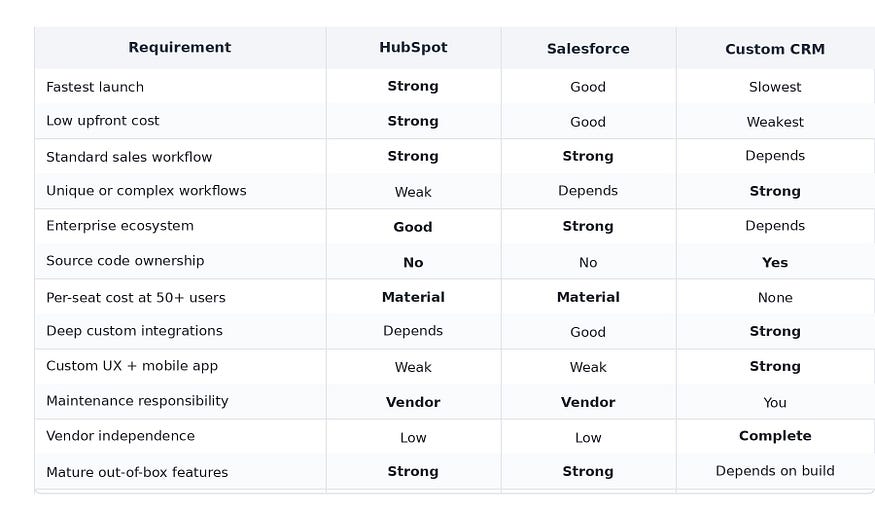
The best option depends less on which platform has the longest feature list and more on how different your business process is from a standard sales workflow. Use this matrix as a first filter before spending weeks on demos or development estimates.
How to Calculate Your Own CRM Break-Even Point
The best option depends less on which platform has the longest feature list and more on how different your business process is from a standard sales workflow. Use this matrix as a first filter before spending weeks on demos or development estimates.

What to Prepare Before Asking for a Custom CRM Quote
A useful CRM estimate needs more than “we need contacts and leads.” The more clearly you can show the current workflow, integrations, and user roles, the more accurate the development estimate and the less likely scope creep becomes during the build.
Before approaching a development team, prepare:

Primocys can review an existing ER diagram, database schema, HTML prototype, or AI-generated prototype alongside your requirements to give a more precise estimate. Send your CRM requirements →
Conclusion: Choosing Your Custom CRM Development Path
Custom CRM development cost, Salesforce pricing, and HubSpot pricing don't compete for the same buyer—they fit different team sizes, workflows, and timelines. Small teams with standard sales stages are usually better served by Salesforce or HubSpot. Growing teams with unique workflows, 30+ users, or deep integration needs typically see custom CRM development pay for itself within the 3-year window shown above.
Run your own numbers using the break-even formula in this guide, then talk to a custom CRM development company that can scope your exact workflow rather than a generic feature list. Talk to Primocys about your Custom CRM →
Know Your CRM Cost First
Share your current CRM, team size, and workflows — get a scope-based estimate to compare against Salesforce or HubSpot with your own numbers.