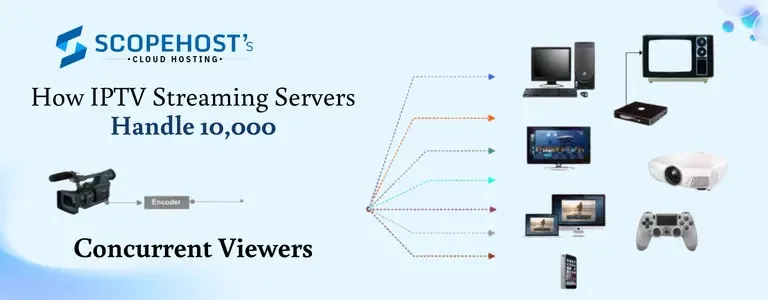
When people hear that an IPTV platform can serve 10,000 concurrent viewers, it sounds massive—and it is. But this scale is no longer limited to global media giants. With the right IPTV streaming servers, network design, and delivery architecture, serving thousands of simultaneous viewers has become both practical and achievable.
The real challenge is not simply streaming a video feed. It is maintaining quality when thousands of viewers press play at the same time, keeping buffering low, preventing crashes, handling bitrate changes, and making sure the stream stays online even during traffic spikes. Whether it is a live sports match, a news broadcast, a music event, or a regional entertainment channel, the system behind the stream has to work like a tightly coordinated machine.
In this article, we will break down how a modern video streaming server setup handles large traffic volumes, what infrastructure matters most, and why scalability is critical for IPTV performance.
Why 10,000 Concurrent Viewers Is a Technical Milestone
A few hundred viewers can often be managed by a decent single server with enough bandwidth. But when the number rises into the thousands, things change fast.
At 10,000 concurrent viewers, an IPTV platform must handle:
- continuous video delivery without lag
- thousands of active network connections
- sudden demand peaks during live events
- different screen sizes and connection speeds
- real-time stream processing
- stable uptime over long viewing sessions
Even a small inefficiency becomes a serious problem at this level. A server that works fine for 300 users may collapse under 10,000 if it lacks the right CPU, RAM, storage speed, port capacity, or traffic routing strategy.
That is why serious IPTV operations depend on high bandwidth streaming server infrastructure rather than ordinary hosting environments.
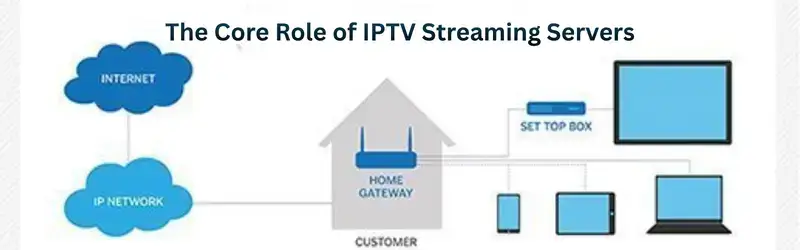
The Core Role of IPTV Streaming Servers
At the center of the system is the IPTV streaming server. Its job is not just to host files. It must receive, process, package, and distribute media streams efficiently.
Depending on the platform, the server may handle:
- live stream ingestion
- transcoding into multiple quality levels
- protocol conversion
- viewer authentication
- segment packaging for HLS or MPEG-DASH
- stream delivery to users or edge nodes
- monitoring and traffic control
A streaming server designed for IPTV has to be optimized for continuous delivery. Unlike normal websites, where users request a page and leave, streaming viewers keep pulling data every second. This creates a constant load on network throughput and system resources.
Step 1: Stream Ingestion and Source Stability
Every IPTV stream starts with a source. It may come from a broadcast feed, an encoder, a studio switcher, or another remote stream endpoint.
The first job of the server infrastructure is to ingest the stream reliably. If the source is unstable, the end viewer will feel it immediately. For that reason, good IPTV systems often use:
- redundant input sources
- backup encoders
- automatic failover feeds
- error correction during transmission
For example, if a main live feed drops during a cricket match or local event, the platform should be able to switch to a backup source without ending the stream. This is the first layer of reliability when supporting 10,000 concurrent viewers.
Step 2: Transcoding for Different Devices and Speeds
Not every viewer has the same internet speed or device capability. Some may watch on smart TVs with strong broadband, while others may use mobile networks with fluctuating speeds.
This is where transcoding becomes essential.
A single input stream is converted into multiple bitrate versions, such as:
- 240p for low-speed networks
- 480p for average mobile viewing
- 720p for standard HD
- 1080p for higher-quality playback
This technique allows adaptive streaming. The player automatically switches between quality levels based on network conditions. Without this, viewers with slower connections would face constant buffering.
Transcoding is one of the heaviest tasks in any video streaming server setup. It uses significant CPU or GPU resources, especially for live content. That is why many IPTV providers separate transcoding from delivery, using dedicated nodes for processing and separate servers for streaming output.
Step 3: Segment-Based Delivery Reduces Load
Modern IPTV platforms do not usually send one long uninterrupted media file. Instead, they break video into small chunks or segments, typically a few seconds long.
This helps in several ways:
- smoother playback
- easier bitrate switching
- better caching
- quicker recovery from network interruptions
- improved delivery over distributed systems
Protocols like HLS and MPEG-DASH are widely used because they are built for scalability. A viewer’s device keeps requesting small pieces of the stream, which makes large-scale delivery more manageable.
For a system serving 10,000 concurrent viewers, segment-based streaming is much more stable than pushing one continuous feed in an outdated format.
Step 4: Load Balancing Prevents Single-Server Failure
One server should never carry the full burden of a large IPTV audience. Even the strongest machine has limits. This is why load balancing is critical.
A load balancer distributes viewer traffic across multiple streaming nodes. Instead of sending all 10,000 users to one machine, the system may spread them across several delivery servers based on:
- current server load
- geographic proximity
- available bandwidth
- health checks
- session persistence rules
This improves stability and prevents overload during sudden traffic bursts. If one node fails, traffic can shift to another active server.
For live IPTV channels, this redundancy is not optional. It is one of the main reasons large-scale streaming platforms stay online during high-demand events.
Step 5: High Port Speed and Bandwidth Matter More Than People Think
Many people focus on CPU and RAM, but IPTV growth is often limited first by bandwidth.
Let’s say one viewer watches at 4 Mbps. If 10,000 viewers are watching simultaneously, that can theoretically require 40 Gbps of outbound traffic. Even with caching, adaptive bitrate, and mixed quality levels, bandwidth demand remains enormous.
That is why a high bandwidth streaming server usually includes:
- 1 Gbps, 10 Gbps, or higher network ports
- unmetered traffic options or very high transfer allowances
- premium upstream connectivity
- low packet loss and low latency routes
If the network is weak, even the best-configured server will struggle. IPTV is ultimately a traffic-heavy service, so network capacity is one of the biggest pillars of performance.
Step 6: CDN and Edge Delivery Improve Viewer Experience
A CDN, or Content Delivery Network, helps IPTV platforms scale beyond the origin server. Instead of forcing every viewer to connect directly to the main streaming node, content can be cached closer to the audience.
This reduces:
- origin server pressure
- international latency
- buffering issues
- network congestion during peak hours
For IPTV businesses targeting viewers across different cities or countries, CDN integration is often a game changer. Live content is more sensitive than static files, but modern CDN-supported workflows can still improve consistency significantly.
In practical terms, the main server handles stream generation and coordination, while CDN or edge locations help distribute the stream more efficiently to large audiences.
To Know More Information Visit : https://www.scopehosts.com/blog/how-iptv-streaming-servers-handle-10000-concurrent-viewers/