
An interface that cannot be read is an interface that cannot be used. In low light, a graphic overlay with no lighting is invisible; in bright light, poorly designed lighting washes out. Backlighting solves both, but only when it is built into the overlay correctly.
Integrating backlighting is not a matter of putting a light behind a panel. It is a design discipline that decides which lighting technology to use, how evenly the light spreads, and how the graphics are printed so the illuminated result is clear rather than blotchy.
Quick answer: Backlighting is integrated into a graphic overlay by building a light source- LEDs, a printed light guide, fiber optics, or an electroluminescent (EL) layer, into the overlay construction, and printing the graphics so light passes through legends and icons evenly. The method chosen depends on brightness, power, thickness, and cost requirements.
Why Backlighting Is a Design Decision, Not an Add-On
The way an overlay is lit has to be planned from the start, because it affects the graphics, the layer stack, and the power budget. Deciding to add lighting after the graphics are designed usually produces uneven brightness and visible hotspots.
A well-designed graphic overlay treats lighting and graphics as one system, so the illuminated legends read cleanly in every lighting condition.
The Main Backlighting Technologies
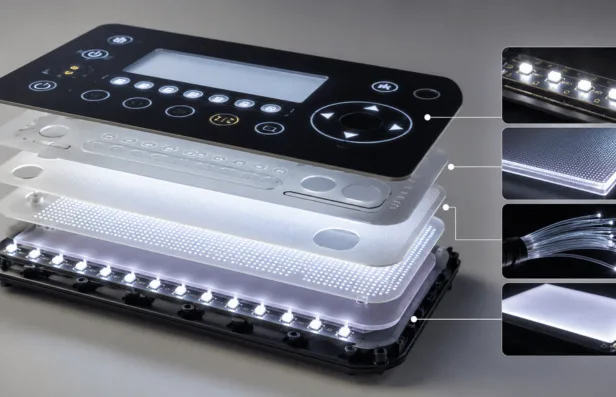
Several technologies exist, each with a different balance of brightness, thickness, power, and cost.
- LED backlighting: bright, efficient, and common, using discrete LEDs behind the overlay
- Light guide film: a printed film that spreads LED light evenly across a large area
- Fiber optic: thin, uniform lighting that works well in flexible or curved designs
- Electroluminescent (EL): a thin, even glow ideal for low-power, uniform backlighting
The right choice depends on how bright the interface must be, how much power is available, how thin it needs to stay, and the budget.
Achieving Even, Hotspot-Free Illumination
The most common backlighting failure is uneven light: bright spots over the LEDs and dark areas between them. Avoiding this is where the engineering lives.
- Light guides and diffusers spread point sources into an even field
- LED placement and density are tuned to the overlay geometry
- Printed dead-fronts hide inactive graphics until they are lit
- Ink layers are chosen so light transmits through legends cleanly
How Graphics and Lighting Work Together
The printing is as important as the light source. Selectively translucent inks let light pass through legends and icons while blocking it elsewhere, which is what creates a crisp lit graphic. Dead-front printing takes this further, keeping a panel blank until backlighting reveals only the icons that are active. These design choices also play a major role in how graphic overlays improve human-machine interface performance by improving visibility, usability, and operator interaction.
Where Manufacturing Precision Becomes Critical
Backlit overlays are unforgiving of inconsistency. Ink opacity, layer registration, and light guide quality all decide whether the lit result is uniform or patchy, and small variations are highly visible once the light is on.
Organizations that produce graphic overlays alongside printed electronics, such as Butler Technologies, Inc., control the printing and lamination in-house so illuminated graphics stay even and legible across a full production run.
The Real Goal of Overlay Backlighting
Good backlighting is invisible as a technology and obvious as a benefit: the interface is simply readable, day or night, without hotspots or washout. That result is designed into the overlay from the first layer, not added at the end.
Key Takeaways
- Backlighting must be designed into the overlay from the start, not added later
- LED, light guide, fiber optic, and EL each balance brightness, thickness, power, and cost
- Even illumination depends on diffusers, LED placement, and ink selection
- Translucent and dead-front printing create crisp, selectively lit graphics
FAQs
What types of backlighting are used in graphic overlays?
The main types are LED backlighting, printed light guide film, fiber optic lighting, and electroluminescent (EL) lighting. Each balances brightness, thickness, power draw, and cost differently.
How do you avoid hotspots in a backlit overlay?
Hotspots are avoided with light guides and diffusers that spread point light into an even field, careful LED placement, and ink layers chosen so light transmits uniformly through the graphics.
What is dead-front printing?
Dead-front printing keeps a panel appearing blank until it is backlit, at which point only the illuminated icons or legends become visible. It creates a clean look and shows only the controls that are active.
Which backlighting is best for thin or low-power designs?
Electroluminescent and fiber optic lighting are well suited to thin, low-power designs because they provide even illumination with minimal thickness and modest power requirements.