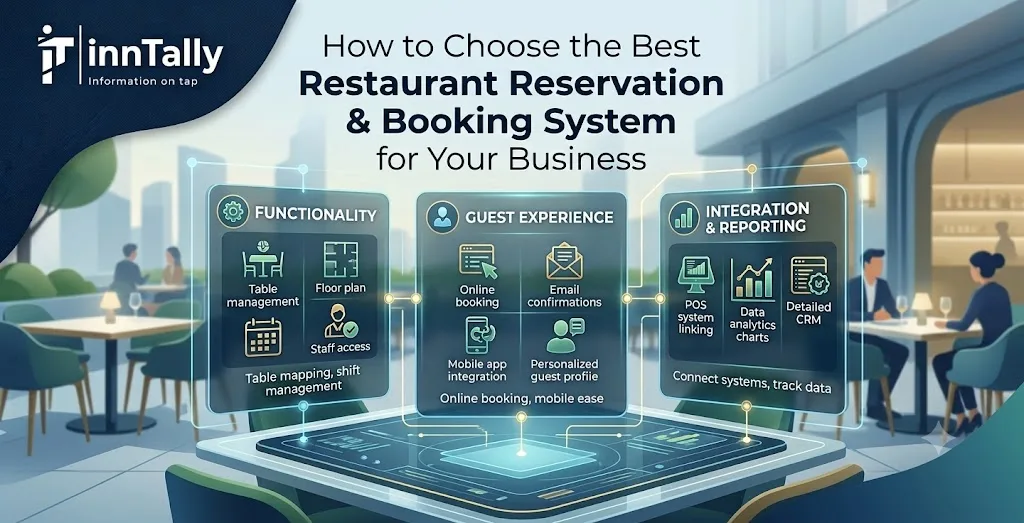
Running a restaurant involves much more than serving great food. You also need to manage tables, reservations, customer expectations, staff, peak-hour demand, cancellations, and no-shows—all while providing a smooth experience from the moment a customer decides to book a table.
This is where a Restaurant Reservation Booking System can make a significant difference.
Instead of relying entirely on phone calls, social media messages, spreadsheets, or paper reservation books, restaurants can use reservation software to centralize bookings and make table management more efficient.
However, choosing the right system can be challenging. There are many solutions available, and each one offers different features, pricing models, integrations, and levels of customization.
So, how do you choose the best Restaurant Reservation Booking System for your business?
This guide covers the most important factors you should consider before making a decision.
What Is a Restaurant Reservation Booking System?
A Restaurant Reservation Booking System is software that allows restaurants to manage table reservations digitally. Customers can typically check availability and book a table online, while restaurant staff can manage reservations through a centralized dashboard.
Depending on the platform, the system may also provide features such as automated confirmations, reminders, waitlist management, customer profiles, table management, reporting, and integrations with other restaurant technology.
The goal is simple: make reservations easier for customers and easier to manage for restaurant staff.
Why Does Your Restaurant Need a Reservation Booking System?
Traditional reservation methods can work for small restaurants, but they often become difficult to manage as customer volume increases.
For example, imagine a busy Friday evening. Your staff may be answering phone calls while seating guests, taking orders, managing cancellations, and communicating with the kitchen. A customer trying to make a reservation may have to wait for someone to answer the phone.
An online Restaurant Reservation Booking System can allow customers to book available tables themselves, even when your restaurant is busy or closed.
A good system can help you:
- Accept reservations 24/7
- Reduce manual booking work
- Avoid double bookings
- Send automated booking confirmations
- Remind customers about upcoming reservations
- Manage cancellations and waitlists
- Organize tables more efficiently
- Collect useful customer information
- Improve the overall guest experience
The right solution should not simply replace your reservation book. It should make your entire reservation process more efficient.
1. Look for an Easy-to-Use Booking Interface
The first thing to consider is usability.
Your customers should not need instructions to make a reservation. The booking process should be straightforward, fast, and intuitive.
Ideally, a customer should be able to select:
- Date
- Time
- Number of guests
- Available table or seating option, if applicable
- Contact information
- Special requests
A complicated booking process can cause customers to abandon their reservations before completing them.
The restaurant staff interface is equally important. Employees should be able to quickly create, edit, move, or cancel reservations without navigating through complicated menus.
When evaluating a Restaurant Reservation Booking System, ask for a demo or trial and test the system from both the customer and staff perspectives.
2. Make Sure It Works Well on Mobile Devices
Many customers search for restaurants and make reservations using smartphones.
Therefore, mobile responsiveness should be a priority.
Your reservation page should look professional and function properly on smartphones and tablets. Buttons should be easy to tap, forms should be simple to complete, and customers should not have to zoom in or scroll excessively.
A mobile-friendly Restaurant Reservation Booking System can make it easier for customers to reserve a table while they are traveling, shopping, commuting, or simply browsing restaurants from their phones.
3. Check Table Management Features
Reservation management and table management go hand in hand.
A good system should help your team understand which tables are available, reserved, occupied, or being prepared for the next guests.
Look for features that allow you to create your restaurant's floor plan and configure different table sizes.
For example, your restaurant may have:
- Two-person tables
- Four-person tables
- Large tables for groups
- Bar seating
- Outdoor seating
- Private dining areas
The system should help you use your available seating efficiently while preventing overlapping reservations.
This becomes especially valuable during busy periods when every table matters.
4. Prioritize Automated Confirmations and Reminders
No-shows can have a direct impact on restaurant revenue.
One of the most useful features of a Restaurant Reservation Booking System is automated communication.
After a customer books a table, the system can send a confirmation through supported communication channels. It may also send a reminder before the reservation.
These reminders give customers an opportunity to confirm, cancel, or modify their reservation.
Look for systems that allow you to customize messages and choose when reminders are sent.
Automation reduces the amount of manual follow-up your employees need to perform.
5. Look for Waitlist Management
Popular restaurants often have more reservation requests than available tables.
Instead of simply turning customers away, a waitlist feature can help you capture additional demand.
For example, if Friday evening is fully booked, customers can join a waitlist for their preferred time. If another guest cancels, your staff can contact the next suitable customer.
An effective waitlist feature can help your restaurant fill tables that would otherwise remain empty.
6. Consider Cancellation and No-Show Management
Not every reservation will result in a visit.
Your reservation system should make it easy to manage cancellations and identify no-show patterns.
Some systems also support deposits, prepayments, or cancellation policies. Whether you need these features depends on your restaurant's business model.
Fine-dining restaurants, event-based restaurants, and restaurants with limited seating may benefit more from advanced reservation policies than casual restaurants.
Before choosing a system, determine what level of cancellation control your business actually needs.
7. Check Integration With Your Existing Technology
Your reservation system should fit into your existing technology ecosystem.
Depending on your setup, you may want integrations with:
- Point-of-sale systems
- Customer relationship management tools
- Payment platforms
- Marketing software
- Email platforms
- Messaging services
- Restaurant websites
- Analytics and reporting tools
Integrations can reduce duplicate data entry and help different parts of your restaurant operation work together.
For example, connecting reservation information with customer data can help your team understand guest preferences and visit history.
8. Look at Customer Management and Guest Profiles
A modern Restaurant Reservation Booking System can do more than store a customer's name and reservation time.
Some platforms allow restaurants to maintain guest profiles containing information such as previous visits, preferences, special occasions, and notes.
This information can help staff provide more personalized service.
For example, if a returning customer frequently requests outdoor seating, having that information available can make future visits smoother.
However, restaurants should always handle customer information responsibly and follow applicable privacy and data-protection requirements.
9. Evaluate Reporting and Analytics
You cannot improve what you cannot measure.
A good reservation system should provide useful reports that help you understand your booking activity.
Depending on the software, you may be able to analyze:
- Number of reservations
- Covers per day
- Peak reservation times
- Cancellation rates
- No-show rates
- Average party size
- Repeat customers
- Booking sources
- Table utilization
These insights can help you make better operational decisions.
For example, if your data shows that reservations consistently peak between 7:00 and 8:00 PM, you can plan staffing and table availability accordingly.
10. Compare Pricing Carefully
Price is important, but the cheapest system is not always the best choice.
Reservation platforms may charge monthly subscription fees, setup costs, per-booking fees, transaction fees, or additional charges for premium features.
When comparing options, calculate the total cost rather than looking only at the advertised monthly price.
Ask:
- Is there a setup fee?
- Are there limits on reservations?
- Are additional locations charged separately?
- Are integrations included?
- Are messaging features included?
- Is customer support included?
- Are payment processing fees separate?
A slightly more expensive system may deliver better value if it saves staff time and helps increase bookings.
11. Check Customer Support
Technology is only useful when it works reliably.
Before purchasing a Restaurant Reservation Booking System, find out what type of customer support is available.
Check whether the provider offers:
- Email support
- Live chat
- Phone support
- Knowledge bases
- Training resources
- Onboarding assistance
- Technical troubleshooting
Also check the support hours. If your restaurant operates late into the evening, support availability may be particularly important.
12. Choose a System That Can Grow With Your Business
Your restaurant may look very different a few years from now.
You might add another location, introduce private dining, expand outdoor seating, or increase your reservation volume.
Choose software that can grow with you.
A scalable Restaurant Reservation Booking System should be able to support additional tables, users, locations, and features without requiring you to completely change platforms.
Switching systems later can be time-consuming, so consider your future requirements as well as your current needs.
Common Mistakes to Avoid When Choosing Reservation Software
Choosing a reservation platform based only on price can lead to problems later.
Avoid these common mistakes:
Choosing Too Many Features
More features do not automatically mean better software. Paying for features your restaurant never uses can increase costs and make the system unnecessarily complicated.
Ignoring the Customer Experience
A system may have excellent administrative features but a poor customer booking experience. Always test the booking process yourself.
Forgetting Mobile Users
If the booking page is difficult to use on smartphones, you may lose potential reservations.
Not Checking Integration Options
If the system cannot connect with your existing tools, your team may have to perform unnecessary manual work.
Failing to Consider Scalability
Choose software that can accommodate your restaurant's expected growth rather than focusing only on today's requirements.
How to Choose the Right Restaurant Reservation Booking System
Ultimately, the best Restaurant Reservation Booking System is the one that fits your restaurant's specific needs.
Start by identifying your biggest challenges.
Are you losing reservations because staff cannot answer every phone call? Are no-shows affecting revenue? Is your team struggling to manage tables during busy periods? Do you need better customer data? Or are you planning to expand to multiple locations?
Once you know what you need to solve, create a list of must-have features.
Then compare different systems based on:
- Ease of use
- Online booking experience
- Mobile compatibility
- Table management
- Automated confirmations and reminders
- Waitlist functionality
- Cancellation management
- Integrations
- Customer management
- Reporting
- Pricing
- Customer support
- Scalability
Request demos or free trials whenever possible. Give your staff an opportunity to test the software before making a final decision.
Final Thoughts
Choosing a Restaurant Reservation Booking System is an important decision because the software becomes part of your everyday restaurant operations.
The right system can reduce administrative work, improve table utilization, minimize reservation errors, reduce no-shows, and create a smoother booking experience for your customers.
However, there is no single solution that is perfect for every restaurant.
A small café may need a simple online booking tool, while a busy fine-dining restaurant may require advanced table management, deposits, customer profiles, analytics, and integrations.
Focus on your restaurant's actual requirements rather than choosing a platform simply because it has the longest feature list.
The best Restaurant Reservation Booking System is one that your staff can use confidently, your customers can book through easily, and your business can continue to rely on as it grows.
Frequently Asked Questions
What is a Restaurant Reservation Booking System?
A Restaurant Reservation Booking System is software that helps restaurants accept, organize, and manage customer table reservations digitally. It can replace or reduce manual booking processes and may include features such as online reservations, table management, reminders, waitlists, and reporting.
What features should I look for in a Restaurant Reservation Booking System?
Important features include an easy booking interface, mobile compatibility, table management, automated confirmations, reservation reminders, cancellation management, waitlists, reporting, customer profiles, integrations, and reliable customer support.
Can a Restaurant Reservation Booking System reduce no-shows?
Yes. Many reservation systems can send automated reminders before a customer's booking. Some also offer deposits, prepayments, or cancellation policies, which can help restaurants manage no-shows more effectively.
Is an online reservation system suitable for small restaurants?
Yes. Small restaurants can benefit from online reservations by reducing phone-based booking work and allowing customers to make reservations outside business hours. The key is choosing a system with features and pricing appropriate for the restaurant's size.
How much does a Restaurant Reservation Booking System cost?
Pricing varies significantly between providers. Some charge a monthly subscription, while others may charge per reservation, transaction fees, setup fees, or additional fees for premium features. Compare the complete cost rather than looking at the base price alone.
Can reservation software integrate with a restaurant POS system?
Many modern reservation platforms offer integrations with POS systems and other restaurant technologies. Before choosing a solution, verify that it supports the specific POS and tools your restaurant currently uses.
Should I choose a cloud-based Restaurant Reservation Booking System?
Cloud-based systems can be convenient because restaurant staff can access the platform through supported devices without relying on a single computer. They can also make it easier to manage reservations remotely and support multiple locations.
What is the most important factor when choosing restaurant reservation software?
The most important factor is whether the system solves your restaurant's specific operational challenges while providing a simple experience for both staff and customers. Features, price, integrations, scalability, and support should all be evaluated together.