
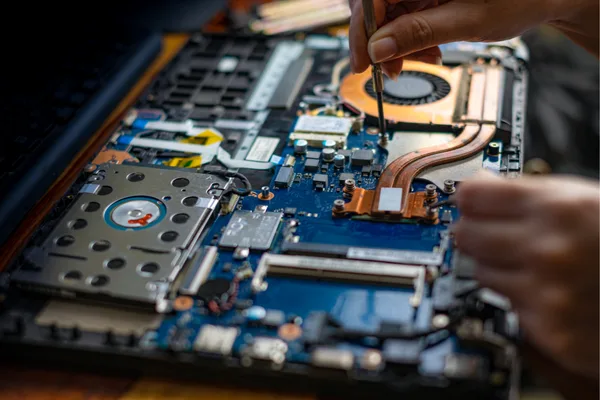
There are few technology problems more immediately stressful than sitting down to use your laptop, pressing the power button, and being met with complete silence and a blank screen. No startup sound, no fan spinning up, no indicator lights, nothing at all to suggest the machine is receiving power or attempting to start. It's a situation that tends to feel far more serious than it might actually be, and the instinct to assume
catastrophic failure is understandable but often premature. Laptops that refuse to turn on can be caused by a surprisingly broad range of issues, some of which are straightforward to resolve with a few basic checks, and others that do require professional attention to properly diagnose and fix. The most important thing is to approach the problem methodically rather than jumping straight to conclusions about the machine being beyond help.
Understanding What Might Be Stopping Your Laptop From Starting
When a laptop produces no response whatsoever to the power button, the underlying cause usually sits within one of a few key areas. Battery and power supply problems are the most common starting point, since a charger that has developed an internal fault, a charging cable with damaged wiring, or a battery that has fully depleted or reached the end of its working life can all prevent the laptop from powering on even when everything else inside the machine is perfectly functional. Beyond the power supply, internal hardware faults are another significant category of causes. A failed motherboard, damaged RAM that prevents the system from initialising, or a corrupted BIOS can all stop a laptop from starting with no visible warning signs beforehand. Overheating that caused a thermal shutdown in a previous session, particularly in a laptop that hadn't been cleaned in some time, can occasionally leave the machine in a state where it won't restart until the internal temperature has fully normalised, though this is less common than power-related causes.
Practical Steps to Try Before Seeking a Technician
Working through a logical sequence of checks at home can sometimes resolve the issue without needing professional help, and it also helps narrow down the cause if you do end up bringing the laptop in for repair. Start by trying a different power outlet, since a faulty wall socket is an easy thing to overlook and rules out the simplest external cause immediately. If you have access to a compatible replacement charger, testing with that tells you quickly whether the original adapter is the problem. Removing the battery on laptops where this is possible, holding the power button for around 30 seconds to discharge residual power from the system, and then attempting to start the laptop on charger power alone is a useful step that resolves the issue for some users. Checking for any indicator lights, even a brief flicker when the charger is connected, gives useful information about whether the machine is receiving any power at all. When none of these steps produce a response, the problem has moved beyond what basic home troubleshooting can resolve, and reaching out for professional computer repairs Notting Hill ensures the machine gets a proper diagnostic assessment rather than further guesswork.
What Our Notting Hill Customers Are Saying About Same Day Mac Repairs
"My laptop stopped turning on completely one Sunday night right in the middle of an important deadline. I tried everything I could think of including different chargers and holding the power button for ages but nothing worked at all. I called Same Day Mac Repairs first thing Monday morning and they were able to see me straight away. The technician ran a full diagnostic and found that a power surge had caused a fault on the motherboard that was stopping it from initialising. They repaired it the same day and all my files were completely intact when I got it back. I honestly expected to be told I needed a new laptop entirely so I was relieved and grateful. Fast, professional, and very fairly priced. Would not hesitate to recommend them to anyone in the area."
— Priya N., Notting Hill
⭐⭐⭐⭐⭐
When Basic Troubleshooting Points to a Deeper Hardware Problem
If working through the basic checks produces no response at all from the laptop, the issue is most likely sitting at a hardware level that requires proper diagnostic equipment to identify accurately. A motherboard fault is one of the more serious possibilities, and while it sounds alarming, it doesn't automatically mean the laptop is beyond repair or that your data is lost. Skilled technicians can often identify the specific component on the motherboard that has failed and repair it directly rather than replacing the entire board, which makes a significant difference to the cost and viability of the repair. RAM failure is another hardware cause that produces complete startup failure, and since most modern laptops have RAM soldered directly onto the motherboard rather than seated in removable slots, diagnosing and addressing this fault requires professional tools rather than the simple reseating process that worked on older machines. A failed display that makes the laptop appear completely dead when it's actually running is also worth ruling out, particularly if the machine makes any sound at all during a startup attempt.
The Risk of Continued DIY Attempts on a Faulty Machine
One of the less obvious risks of repeatedly attempting to power on a laptop that has a hardware fault is that it can sometimes worsen the underlying problem. If the machine is experiencing a short circuit or a failing component on the motherboard, each power attempt places additional stress on already compromised circuitry. If there is any possibility that liquid has entered the machine at some point, whether from a spill or prolonged humidity exposure, attempting to power it on before the internal components have been properly dried and cleaned significantly increases the likelihood of permanent damage to the motherboard. In these situations stopping the power attempts and getting the laptop assessed quickly gives you the best chance of both a successful repair and intact data recovery.
Conclusion: Getting Your Notting Hill Laptop Back to Full Working Order
A laptop that won't turn on covers a wide range of possible causes, from something as simple as a faulty charger or depleted battery through to more involved hardware faults on the motherboard or internal power circuitry. Working through the basic checks around power supply and charger first is always the right starting point, since these are quick to rule out and occasionally turn out to be the entire explanation. When those steps don't produce any result, the situation calls for proper hands-on diagnosis rather than continued attempts that risk adding to the problem. Same Day Mac Repairs can properly assess what is preventing your Notting Hill laptop from starting, identify whether the fault lies with the power system, internal hardware, or firmware, and carry out the necessary repair to get your machine back to reliable working order, along with everything stored on it, without the stress of not knowing what went wrong or whether it can be fixed.