The demand for convenient, reliable, and fast home services has created new opportunities for businesses to build on-demand service marketplaces. Customers today prefer finding professionals online instead of spending time searching through local directories, making multiple phone calls, or waiting for recommendations.
A Thumbtack Clone App provides a digital marketplace where customers can discover local professionals, compare services, check ratings, request quotes, schedule appointments, and make secure payments from one platform. For entrepreneurs, this model can be adapted for handyman services, home cleaning, plumbing, electrical work, appliance repair, painting, carpentry, and many other local services.
A well-designed on-demand service booking app connects customers with verified service providers based on location, availability, service category, pricing, and customer ratings. It can also provide businesses with multiple revenue opportunities through commissions, subscriptions, featured listings, and service fees.
This guide explains what a Thumbtack clone app is, how it works, its essential features, business model, development process, estimated cost factors, and how entrepreneurs can use the concept to launch an on-demand handyman or local service marketplace.
What Is a Thumbtack Clone App?
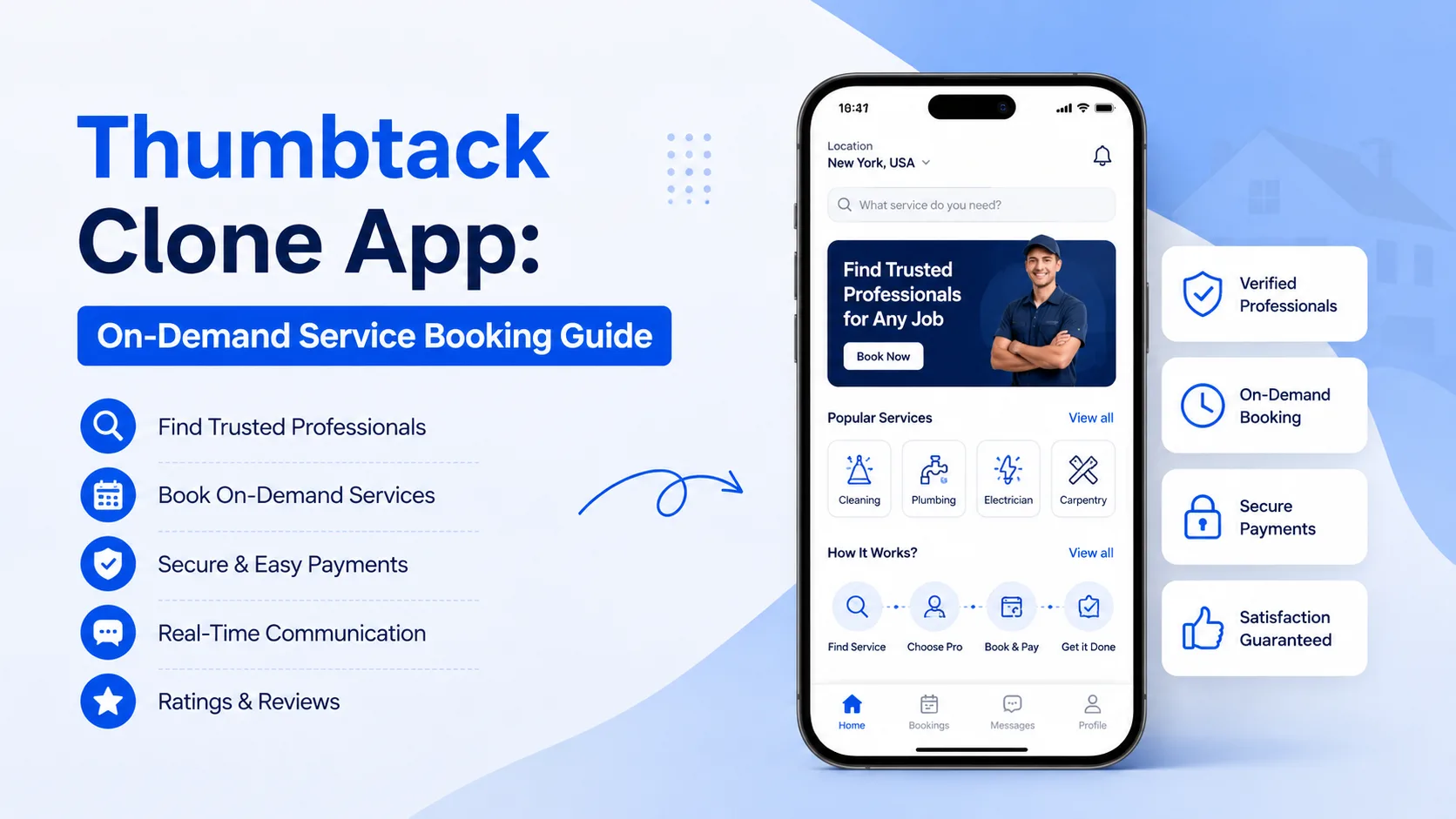
A Thumbtack Clone App is an on-demand service marketplace application inspired by the core concept of platforms such as Thumbtack. It allows customers to find professionals for different services and enables service providers to promote their skills and accept service requests.
Instead of creating a platform for only one service category, businesses can build a flexible marketplace that supports multiple services. For example, a customer could use the application to find a plumber, electrician, cleaner, carpenter, painter, or appliance repair professional.
The platform generally consists of three major components:
- Customer app
- Service provider app
- Admin panel
Customers use the application to search and book services, providers manage requests and availability, and administrators control the overall marketplace.
A business can also customize the application according to its target market, service categories, pricing model, location, branding, and business requirements.
How Does a Thumbtack-Like Service Booking App Work?
The main purpose of an on-demand service booking application is to simplify the process of finding and hiring local professionals.
A typical workflow looks like this:
1. Customer Registration
Customers create an account using their basic information. Depending on the platform, registration can support email, phone number, or social login.
2. Service Selection
The customer selects the required service from available categories. For example, they may choose plumbing, cleaning, electrical repair, painting, or furniture assembly.
3. Location-Based Provider Discovery
The application uses location information to display professionals who provide the selected service in the customer's area.
4. Provider Comparison
Customers can compare provider profiles, ratings, reviews, experience, pricing information, availability, and service details.
5. Service Request or Booking
The customer submits a request with relevant information such as service requirements, preferred date, time, address, and additional instructions.
6. Provider Response
The service provider receives the request and can accept it, reject it, or provide a quote depending on the marketplace model.
7. Service Completion
Once the provider completes the job, the booking is marked as completed.
8. Payment and Review
Customers can make payments through the integrated payment system and leave ratings or reviews based on their experience.
This complete workflow helps create a convenient experience for both customers and service professionals.
Why Build a Thumbtack Clone App?
The on-demand service marketplace model can provide significant opportunities for businesses targeting local service industries.
Traditional service discovery often depends on word-of-mouth recommendations, local advertisements, directories, or direct phone calls. A mobile marketplace can bring these activities into one centralized platform.
Convenience for Customers
Customers can search for professionals, compare providers, schedule services, and manage bookings through their smartphones.
More Opportunities for Service Providers
Professionals can use the platform to showcase their services and reach potential customers within their service area.
Location-Based Service Discovery
Businesses can connect customers with nearby professionals, making the platform particularly useful for urgent handyman and home repair services.
Multiple Service Categories
The marketplace can support several categories instead of depending on a single service.
Scalable Business Model
Entrepreneurs can start with a few categories in one location and gradually expand to additional services, cities, and regions.
Key Features of a Thumbtack Clone App
A successful service marketplace needs features for customers, service providers, and administrators.
Customer App Features
User Registration and LoginCustomers should be able to create accounts quickly and securely. Phone verification, email authentication, and social login can simplify the registration process.
Service SearchA powerful search feature allows users to find services based on keywords, categories, location, availability, or other filters.
Service CategoriesOrganize services into clear categories such as:
- Plumbing
- Electrical services
- Cleaning
- Painting
- Carpentry
- AC repair
- Appliance repair
- Pest control
- Furniture assembly
- Lawn and garden services
Customers should be able to view detailed professional profiles containing:
- Provider name
- Profile image
- Service categories
- Experience
- Service area
- Ratings
- Customer reviews
- Pricing or quote information
- Availability
GPS and map integration can help identify providers who operate near the customer's location.
Booking and SchedulingCustomers can select a preferred date and time based on provider availability.
Multiple AddressesA useful feature for customers who need services at different locations, such as homes, offices, rental properties, or commercial spaces.
Secure Online PaymentsPayment integration allows customers to pay for completed or scheduled services through supported payment methods.
Booking ManagementCustomers can view upcoming, active, completed, and cancelled bookings from their accounts.
Push NotificationsNotifications can inform users about booking confirmations, provider responses, schedule changes, payment updates, and service completion.
Ratings and ReviewsAfter completing a service, customers can rate providers and share feedback. This helps future customers make better decisions.
Service Provider App Features
The provider application is equally important because service professionals are the supply side of the marketplace.
Provider RegistrationProfessionals can submit their details and create service profiles.
Profile ManagementProviders can update their descriptions, service categories, pricing information, working areas, images, and other professional information.
Service ManagementProviders can select the services they offer and configure relevant service details.
Availability ManagementProfessionals can define working hours and availability so customers can request appointments at suitable times.
Booking Request ManagementProviders can receive, accept, reject, or manage customer requests.
Quote ManagementFor services where the final price depends on the job, providers can submit customized quotes.
Earnings DashboardProviders can track completed jobs, earnings, commissions, and payment information.
NavigationMap and navigation functionality can help providers reach customer locations.
Ratings and ReviewsProviders can monitor customer feedback and maintain their marketplace reputation.
Admin Panel Features
The admin dashboard provides centralized control over the entire service marketplace.
User ManagementAdministrators can manage customer accounts, profiles, activity, and account status.
Provider ManagementThe admin can review provider registrations, manage profiles, monitor service categories, and control provider access.
Service Category ManagementAdministrators can add, edit, remove, and organize service categories.
Booking ManagementThe dashboard can provide an overview of ongoing, completed, cancelled, and pending bookings.
Payment ManagementAdministrators can monitor transactions, commissions, refunds, and provider payouts.
Review ManagementThe admin can monitor ratings and reviews to maintain marketplace quality.
Promotions and CouponsBusinesses can create promotional campaigns, discount codes, and special offers to attract new customers.
Analytics and ReportsAnalytics can provide insights into bookings, revenue, popular services, customer activity, provider performance, and marketplace growth.
Types of Services for a Thumbtack Clone App
One of the biggest advantages of this business model is flexibility.
An entrepreneur can initially focus on one category, such as handyman services, and later add additional categories.
Popular options include:
Handyman Services
A handyman marketplace can connect customers with professionals for general repairs, furniture assembly, maintenance, and home improvement tasks.
Plumbing
Users can find local plumbers for repairs, installations, leaks, and maintenance.
Electrical Services
Customers can book electricians for installation, maintenance, troubleshooting, and repair requirements.
Home CleaningA platform can connect customers with professional cleaners for regular, deep, move-in, and move-out cleaning.
Painting
Customers can request residential or commercial painting services.
Appliance Repair
Professionals can provide repair and maintenance for household appliances.
Carpentry
Customers can hire carpenters for furniture work, repairs, installations, and customized projects.
Lawn and Garden Services
Users can book professionals for lawn maintenance, gardening, landscaping, and related services.
By supporting multiple categories, a Thumbtack-style application can evolve into a broader on-demand service marketplace.
Thumbtack Clone App Business Model
Choosing the right monetization strategy is an important part of marketplace development.
Commission-Based Model
The platform can charge a percentage of each successful booking.
For example, if a customer pays a provider through the marketplace, the platform can retain a predefined commission and transfer the remaining amount to the provider.
Provider SubscriptionProfessionals can pay a monthly or annual subscription to access premium marketplace features.
Featured Listings
Providers can pay to receive greater visibility in search results or featured service sections.
Service Fees
The platform can charge customers an additional booking or convenience fee.
Advertising
Businesses can offer promotional placements to service providers who want to increase their visibility.
Premium Provider Plans
Advanced plans can provide additional features such as analytics, enhanced profiles, priority leads, or promotional tools.
A business can use one monetization strategy or combine multiple models depending on its target market.
How to Build a Thumbtack Clone App
Building an on-demand service marketplace requires careful planning and development.
Step 1: Define the Business Model
Determine the target customers, service categories, operating location, pricing structure, commission model, and revenue strategy.
Step 2: Select Service Categories
Decide whether the application will focus on handyman services or support several categories from the beginning.
Step 3: Design the User Experience
Create simple interfaces for customers and providers. The booking process should require as few unnecessary steps as possible.
Step 4: Develop Customer and Provider Apps
Build dedicated functionality for customers and professionals. Depending on the business requirements, applications can be developed for Android, iOS, or both.
Step 5: Develop the Admin Panel
The admin dashboard should provide complete control over users, providers, bookings, services, payments, reviews, and reports.
Step 6: Integrate Essential Technologies
Depending on requirements, the application may require:
- GPS and maps
- Payment gateways
- Push notifications
- Cloud services
- Real-time communication
- Authentication
- Analytics
- API integrations
Step 7: Test the Application
Testing should cover registration, service search, booking, provider acceptance, payments, notifications, cancellations, and other important workflows.
Step 8: Launch and Scale
After deployment, businesses can monitor user behavior, collect feedback, improve features, add new services, and expand into additional locations.
How Much Does a Thumbtack Clone App Cost?
The cost of developing a Thumbtack clone app depends on the scope and level of customization.
Important cost factors include:
- Number of platforms
- UI/UX customization
- Customer features
- Provider features
- Admin functionality
- Payment integrations
- Map and location services
- Real-time communication
- Third-party integrations
- Number of service categories
- Custom business workflows
- Backend architecture
- Security requirements
- Testing and maintenance
A basic service marketplace with essential features will generally require less development than a highly customized multi-service platform with advanced automation and integrations.
Instead of focusing only on the initial development cost, businesses should consider scalability, security, customization, maintenance, and long-term operational requirements.
Why Choose a Ready-Made Thumbtack Clone Solution?
Developing an on-demand marketplace completely from scratch can require considerable time for planning, design, development, testing, and deployment.
A ready-made clone solution can provide a faster starting point while still allowing businesses to customize the platform according to their requirements.
With a customizable solution, entrepreneurs can build a branded service marketplace with customer and provider applications, an admin dashboard, booking management, payments, ratings, notifications, and other essential functionality.
For businesses specifically targeting home maintenance and repair services, an on-demand handyman solution can provide the foundation needed to connect customers with local professionals.
You can explore the Handyman App Like Uber solution to see how an on-demand handyman marketplace can be structured for customer bookings, service providers, and business management.
Conclusion
A Thumbtack Clone App can provide a strong foundation for entrepreneurs looking to enter the growing on-demand service marketplace. By connecting customers with local professionals through service discovery, provider profiles, booking, scheduling, payments, ratings, and reviews, the platform can simplify the entire service-booking process.
The same concept can be adapted for a dedicated handyman app, home-service marketplace, or multi-service platform. Businesses can start with a focused category and gradually expand into additional services and locations as the marketplace grows.
The key to building a successful platform is not simply copying an existing application. It is creating a marketplace that solves real customer problems, provides valuable leads to professionals, offers a smooth booking experience, and supports a sustainable business model.
For entrepreneurs targeting handyman and home services, a customizable Handyman App Like Uber can be a practical starting point for launching an on-demand service marketplace and building a scalable digital business.
Frequently Asked Questions (FAQs)
1. What Is a Thumbtack Clone App?
A Thumbtack clone app is an on-demand service marketplace that connects customers with local professionals. Customers can search for services, compare providers, request or schedule services, make payments, and leave reviews through the platform.
2. How Does a Thumbtack-Like Service Booking App Work?
Customers select a service, provide their location and requirements, discover relevant professionals, compare profiles, request a service or quote, schedule an appointment, and complete payment after the service. Providers use their application to manage requests, availability, bookings, and earnings.
3. How Much Does It Cost to Build a Thumbtack Clone App?
The cost depends on factors such as platform selection, customization, features, integrations, design, backend requirements, payment systems, and development scope. A customized multi-service marketplace generally requires a larger investment than a basic service-booking application.
4. What Features Should a Thumbtack Clone App Have?
Important features include service search, categories, provider profiles, location-based discovery, booking and scheduling, payments, notifications, ratings and reviews, provider availability, booking management, earnings tracking, and an admin dashboard.
5. How Can I Launch a Thumbtack Clone App for Handyman Services?
You can start by defining your target market and handyman categories, selecting the required customer and provider features, customizing the application design and branding, integrating payments and location services, testing the platform, and launching it in your selected market. A ready-made handyman marketplace solution can help reduce the time required to launch.