In a world where laptops and tablets are becoming slimmer and more portable, one common challenge remains: limited connectivity. Many modern devices feature only one or two USB-C ports, making it difficult to connect essential accessories such as monitors, keyboards, external drives, memory cards, and wired internet. A USB C hub solves this problem by transforming a single USB-C port into a complete connectivity center.
Whether you work from home, attend online classes, edit photos, travel frequently, or simply want a more organized setup, a USB C hub offers unmatched convenience. With support for high-speed data transfer, 4K display output, pass-through charging, and multiple device connections, this compact accessory has become an indispensable part of modern digital life.
What Is a USB C Hub?
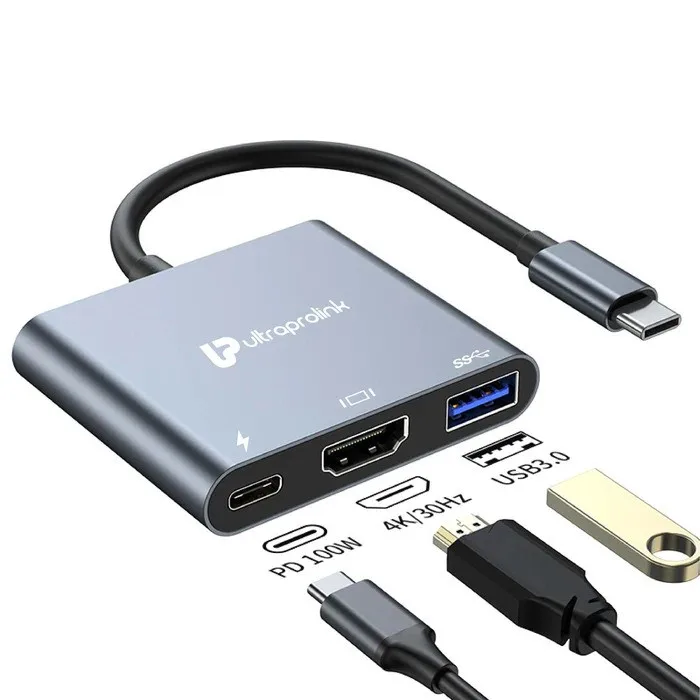
A USB C hub is a multiport adapter designed to expand the capabilities of a device equipped with a USB-C port. By connecting the hub to your laptop, tablet, or smartphone, you instantly gain access to additional ports that allow multiple peripherals to work simultaneously.
Typical ports found on a USB C hub include:
- USB 3.0 and USB 2.0 ports
- HDMI or VGA video output
- SD and microSD card readers
- Ethernet (RJ45) for wired internet
- USB-C Power Delivery charging
- 3.5mm audio jack
This means one small accessory can replace several adapters and streamline your workspace.
Why USB C Hubs Are Essential Today
Leading manufacturers such as Apple, Dell, HP, Lenovo, ASUS, and Samsung increasingly use USB-C as the universal connection standard.
USB-C supports:
- Data transfer
- Video output
- Device charging
- Audio transmission
Despite its versatility, many devices include very few ports. A USB C hub unlocks the full potential of your device by enabling seamless multitasking and broader compatibility.
Major Benefits of Using a USB C Hub
Connect Multiple Accessories at Once
Use a mouse, keyboard, external hard drive, monitor, and charging cable simultaneously without unplugging anything.
Enjoy Ultra-Fast Data Transfers
USB 3.0 and USB 3.2 ports can transfer large files quickly, making them ideal for photographers, designers, and professionals.
Display Stunning 4K Video
Connect to TVs, monitors, or projectors for presentations, streaming, and dual-screen productivity.
Charge While You Work
Power Delivery pass-through allows your device to charge while all hub ports remain fully functional.
Improve Workspace Efficiency
Reduce cable clutter and simplify your desk setup with one compact connectivity solution.
Travel Light
Replace multiple adapters with one lightweight hub that fits easily into your bag.
Different Types of USB C Hubs
Compact USB C Hub
Provides a few USB ports and is ideal for everyday tasks.
HDMI USB C Hub
Adds video output for connecting to external displays.
SD Card USB C Hub
Perfect for photographers and videographers who transfer media frequently.
Ethernet USB C Hub
Offers a stable wired network connection for faster internet.
Full-Featured USB C Dock
Designed for professional workstations with multiple display outputs and expanded connectivity.
Best Uses for a USB C Hub
A USB C hub enhances productivity in countless scenarios:
- Office work and remote meetings
- Online education and presentations
- Photo and video editing
- Gaming with wired internet
- File backup and storage management
- Streaming and entertainment
- Business travel and hot-desking
Devices That Commonly Use USB C Hubs
USB C hubs are compatible with a wide range of modern devices, including:
- MacBook Pro
- MacBook Air
- iPad Pro
- Dell XPS 15
- HP EliteBook
- Lenovo ThinkPad X1 Carbon
- Microsoft Surface Pro
- Samsung Galaxy Tab S9
Features to Consider Before Buying a USB C Hub
Choosing the right USB C hub depends on your workflow. Important factors include:
- Number of USB ports
- HDMI resolution and refresh rate
- Power Delivery wattage
- Ethernet speed
- SD card compatibility
- Cable length and design
- Aluminum build for better heat dissipation
- Operating system support
USB C Hub vs Traditional Adapters
Traditional adapters solve one problem at a time, while a USB C hub combines multiple functions into a single device. Instead of carrying separate HDMI, USB, and Ethernet adapters, one hub handles all of these tasks efficiently.
Performance and Productivity Advantages
A USB C hub can significantly improve your daily workflow by:
- Reducing setup time
- Increasing desk organization
- Supporting multitasking
- Simplifying presentations
- Enabling faster content creation
- Enhancing mobility
Professionals who rely on external monitors, storage drives, and stable internet connections often consider a USB C hub an essential productivity tool.
Common Problems a USB C Hub Solves
- Too few ports on modern laptops
- Lack of SD card slots
- No HDMI connection for monitors
- Unstable Wi-Fi during meetings
- Inability to charge while using accessories
- Constant swapping of devices
Tips for Long-Term Reliability
To keep your USB C hub performing at its best:
- Avoid exposing it to moisture
- Use certified chargers
- Keep ports free from dust
- Disconnect carefully
- Store it in a protective case
- Avoid excessive cable strain
Frequently Asked Questions
Can a USB C hub support dual monitors?
Some advanced hubs and docks support multiple displays depending on your device’s capabilities.
Will a USB C hub work with smartphones?
Many Android devices with USB-C and OTG support can use compatible hubs.
Is a powered USB C hub better?
Powered hubs are useful when connecting multiple high-power devices.
Does HDMI work on every USB-C port?
Only USB-C ports with video output support can drive external displays.
Can I use a USB C hub every day?
Yes. Quality hubs are designed for regular professional and personal use.
Conclusion
A USB C hub is a practical and powerful accessory that expands the capabilities of modern devices. It combines charging, high-speed data transfer, video output, and peripheral connectivity in one compact tool. Whether you are working, studying, creating, or traveling, a USB C hub makes your setup more flexible, efficient, and future-ready.
If you want to maximize the performance of your laptop or tablet, a USB C hub is one of the smartest and most useful investments you can make.