
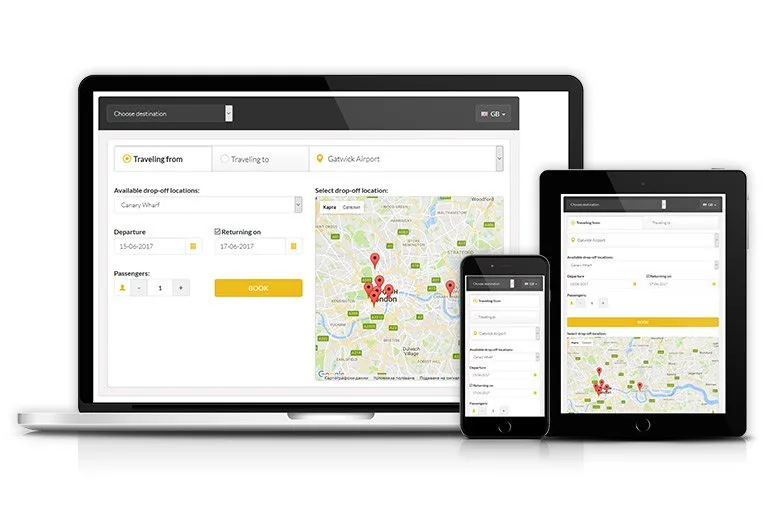
What to Look for When Choosing Shuttle Booking Software
Running a shuttle service often looks straightforward from the outside. A vehicle follows a route, passengers get on and off, and the journey is completed. Behind that simple experience, however, operators are dealing with bookings, schedules, drivers, vehicle availability, passenger capacity, and last-minute changes.
This is why choosing the right shuttle booking software requires more thought than comparing a list of features. The right platform should fit the way a business already operates while making daily transportation easier to manage.
For hotels, corporate transport providers, schools, tourism companies, and private shuttle operators, several factors deserve attention before making a decision.
Start With Your Actual Transport Workflow
Before looking at software providers, map out how bookings and trips are handled today.
Ask simple questions:
- How do passengers make reservations?
- Who confirms each booking?
- How are seats allocated?
- How are drivers informed about new trips?
- How are route changes communicated?
- How does the team know where vehicles are?
- How are cancellations recorded?
- What information is needed after a trip?
This exercise can reveal where the biggest problems are.
For example, a company may not have a booking problem at all. Its main difficulty may be coordinating 20 drivers across recurring employee routes. In that situation, scheduling and driver management may be more important than having a sophisticated passenger-facing booking page.
Booking Should Be More Than a Reservation Form
A basic online form can collect a passenger's name, destination, and preferred time. That does not necessarily make it a complete shuttle management system.
Good software should connect the reservation with the rest of the operation.
When someone books a seat, the system should ideally know which route the passenger belongs to, how much capacity remains, and which scheduled trip is involved.
For recurring services, such as employee transportation, the platform should also make it possible to manage regular bookings without entering the same information repeatedly.
The fewer disconnected steps staff have to manage, the lower the chance of administrative errors.
Check How the System Handles Seats and Capacity
Seat availability is one of the most important considerations for shared transportation.
Imagine a shuttle with 25 seats. If 23 passengers have already reserved places, the system needs to reflect that capacity accurately. Otherwise, staff may accidentally accept more bookings than the vehicle can accommodate.
Capacity management becomes even more important when an operator has vehicles with different seating arrangements.
A useful platform should make it easy to understand:
- Total vehicle capacity
- Reserved seats
- Available seats
- Passenger lists
- Trip-specific capacity
- Vehicle changes
This information gives dispatchers a practical view of each upcoming journey.
Route Management Should Match Your Business Model
Not every shuttle service operates in the same way.
Some businesses use fixed routes and fixed departure times. Others operate airport transfers. Some provide employee transportation on recurring schedules, while tourism operators may create temporary routes for specific groups.
The software should accommodate the model rather than forcing the operator to change its entire workflow.
Look for flexibility around pickup points, drop-off locations, stops, service areas, and departure times.
For businesses expecting growth, it is also worth checking how easily new routes can be added. A platform that works well for five routes may become difficult to manage if the company eventually operates fifty.
Driver Management Cannot Be an Afterthought
A booking has to reach the person responsible for completing the trip.
Driver management tools can connect assigned journeys with driver schedules and vehicle information. Depending on the system, drivers may receive trip details through a mobile application and update the status of their journeys as they progress.
This can reduce dependence on phone calls and scattered messages.
Suppose a driver is assigned to an airport transfer. Instead of receiving separate messages containing the passenger details, pickup time, and location, the relevant information can be available through one workflow.
That creates a clearer connection between the booking desk and the person actually operating the vehicle.
Live Tracking Can Change How Dispatchers Work
GPS tracking is another feature worth examining closely.
The value of tracking is not simply being able to see a vehicle moving across a map. It is the information that becomes available while the trip is underway.
A dispatcher can potentially identify whether a vehicle has started its route, where it is located, and whether it appears to be running behind schedule.
For passengers, tracking can also reduce uncertainty. Instead of repeatedly asking when the shuttle will arrive, they may be able to view relevant trip information through the passenger application.
Businesses should still consider privacy and data-handling policies when using location tracking.
Look at the Passenger Experience Too
A system can be excellent for administrators and still be frustrating for passengers.
The passenger side should be simple enough for someone to book a trip without needing instructions from customer support.
Consider the entire customer journey:
Search for a trip → Select a suitable option → Reserve a seat → Receive confirmation → Get trip updates → Reach the pickup point → Complete the journey
If any step is unnecessarily complicated, customers may abandon the process or contact staff for assistance.
For hotels and tourism businesses, this becomes especially important because passengers may be unfamiliar with the service.
Payment Features Depend on Your Business Model
Payment functionality should match how the shuttle service actually makes money.
A corporate employee shuttle may be paid for through an agreement with the employer. A hotel could include transportation in a guest package. A tourism company may collect payment during the booking process.
Therefore, operators should not automatically choose a platform simply because it supports a particular payment method.
Instead, determine whether the system can accommodate the required model, including online payments, receipts, invoicing, or account-based billing where necessary.
Reporting Can Reveal Problems That Staff Do Not Notice
A good transport platform should not stop working once a trip is completed.
Historical data can help management understand how the operation is performing.
Useful reports might cover:
- Booking volumes
- Passenger occupancy
- Cancellations
- Completed trips
- Vehicle utilization
- Route performance
- Driver activity
- Peak booking periods
Suppose one route consistently operates with very few passengers while another frequently reaches capacity. That information could support a decision about vehicle allocation or scheduling.
The software is not making the business decision by itself. It is giving managers better information with which to make it.
Integration Is Important for Growing Operations
Transportation rarely exists in isolation.
A shuttle company may already use accounting software, payment services, customer relationship tools, GPS providers, or employee management systems.
If the new platform cannot communicate with important existing systems, employees may end up entering the same information twice.
Ask vendors about API availability, third-party integrations, and data export options before signing an agreement.
This is particularly important for companies that expect their technology stack to become more sophisticated over time.
Security Deserves Serious Attention
Shuttle platforms may store passenger names, contact details, schedules, employee information, and vehicle locations.
That means security should be considered alongside functionality.
Businesses should ask how user access is controlled, how information is protected, what backup arrangements exist, and how location data is handled.
Different users should also have appropriate permissions. A driver may need trip and passenger information, while an administrator may require access to operational reports and configuration settings.
Do Not Ignore Customization
A generic platform can be useful, but every transportation business has its own rules.
A school shuttle may need student and guardian information. A corporate service may require employee route assignments. A hotel transfer operation may need flight-related booking details.
Customization can help accommodate these differences.
However, excessive customization can increase development and maintenance costs. Businesses should distinguish between changes that are genuinely necessary and features that simply look attractive during a software demonstration.
Test the Software Before Making a Long-Term Commitment
A demonstration can show how the interface looks, but it does not always reveal how the system behaves under real operating conditions.
If possible, test realistic scenarios.
Create a booking. Cancel it. Change a pickup point. Replace a vehicle. Reassign a driver. Check what happens when a trip is delayed. Review the passenger information from the driver's side.
These small tests can expose workflow problems that are easy to miss during a sales presentation.
Also consider the people who will use the system every day. A feature-rich platform that employees find difficult to operate may create more work rather than less.
Think About the Total Cost
The price shown by a software provider may not represent the complete investment.
Businesses should consider:
- Setup or customization costs
- Subscription or licensing fees
- Mobile application costs
- Integration expenses
- Payment gateway charges
- Training
- Technical support
- Maintenance
- Future upgrades
A cheaper platform is not automatically more economical if it requires substantial manual work or expensive modifications later.
The better comparison is the total cost against the operational value the system is expected to provide.
A Practical Way to Compare Providers
Instead of creating a huge checklist, divide requirements into three groups.
Essential: Features the business cannot operate without, such as booking, scheduling, capacity, and driver management.
Important: Functions that improve operations, such as GPS tracking, automated notifications, and reporting.
Future requirements: Capabilities that may become useful as the business expands, such as advanced analytics, integrations, or demand-based scheduling.
This approach makes software comparisons more realistic.
Final Thoughts
Choosing shuttle software is ultimately a workflow decision, not simply a technology purchase. The best platform should make reservations easier to organize, give dispatchers better visibility, help drivers receive accurate information, and provide managers with useful operational data.
Businesses should therefore assess software against their actual routes, passenger volumes, vehicle types, and growth plans. A smaller operator may need a straightforward system, while a larger transportation network may require deeper automation and integration.
For companies exploring digital tools for shuttle operations, Mobility Infotech is one of the providers in this broader software market.
The most sensible choice is the platform that solves today's operational problems without creating unnecessary complexity for tomorrow.