
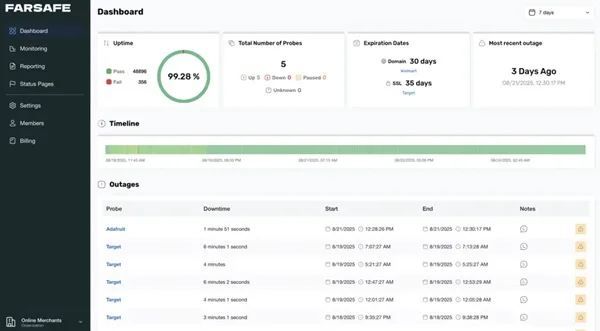
If you run a website, there will likely come a moment when something feels off. A page loads more slowly than usual, a form refuses to submit, or the site becomes completely unreachable for a brief period. Often, these performance bottlenecks go unnoticed until a frustrated visitor points them out or your organic traffic suddenly drops.
This is where proactive website oversight becomes invaluable. It is not just a technical feature for developers, but a practical necessity to understand how your website behaves under real-world conditions. Instead of manually refreshing your homepage, specialized software runs quietly in the background to track availability so operational issues do not slip through the cracks.
What Website Monitoring Actually Does
At its core, a monitoring system answers two essential questions: Is your site reachable, and does it respond within a reasonable timeframe?
Automated systems check your platform at regular intervals and log the results. Sometimes the server responds instantly, while at other times it might drag or fail entirely. Over time, these consistent checks build an objective record of your website’s reliability—insights that are impossible to gather accurately from your own local browser.
This process provides an authentic view of performance because external servers test your pages from outside your private hosting network, mimicking exactly how real visitors experience your site globally.
Why Website Availability Matters More Than You Think
Many website owners focus heavily on content production, visual design, and digital marketing. While those areas are important for growth, underlying reliability quietly dictates their success. When a site becomes unavailable or sluggish, visitors lose trust instantly and bounce to competitors.
Search engine crawlers also prioritize stability. If search bots repeatedly encounter server errors while trying to index your pages, your organic rankings can suffer long-term damage. Even brief, intermittent patches of downtime can have lasting financial effects on service-based businesses, digital portfolios, and online stores that rely on uninterrupted consumer access.
How Monitoring Services Identify Structural Issues
Most modern platforms work by sending automated, periodic requests to your website from a network of external data hubs. These requests simulate a real user loading a webpage and waiting for a response.
If a request fails or takes too long to complete, the system records the exact error code and timestamp. Over days and weeks, this data reveals hidden infrastructure patterns, such as recurrent downtime during peak traffic hours or performance drops caused by hosting provider limitations.
Performance Is More Than Just Being Online
A website can technically be online while still offering a poor user experience. A server returning a basic success code might still take ten seconds to render actual content, which is why comprehensive Website Monitoring Tools track precise response times alongside basic uptime.
Performance tracking focuses on how quickly a page begins transmitting data and whether that speed degrades during high usage periods. These specific metrics help you uncover underlying database struggles or heavy script loads before they turn into full-scale site crashes.
Free Tracking Options vs. Dedicated Platforms
Not every website requires an enterprise-level, highly complex setup immediately. Many site owners begin with basic utilities to understand how infrastructure data is gathered.
Standard free options typically track basic homepage availability and send simple email alerts when a major crash occurs. However, they often check your site less frequently and offer very short data retention windows, making long-term pattern analysis difficult.
For a new blog or small project, basic tracking is an excellent starting point. As your audience grows and your website becomes central to your business income, moving to a dedicated service like Farsafe provides faster check frequencies, multi-channel team notifications, and deep historical reporting without forcing you into expensive subscription tiers.
Frequently Asked Questions
Does monitoring software slow down my website?No. External monitoring platforms work by simulating a single visitor accessing your site every few minutes. This process creates an incredibly small amount of network traffic—equivalent to just one extra visitor every few minutes. It has no impact on server load and remains completely invisible to your regular audience.
How often should my website be checked?The ideal check frequency depends on the nature of your digital platform. For a personal hobby blog, checking every five to ten minutes is often sufficient. For business websites, lead-generation pages, or online shops, one-minute intervals are highly recommended. Faster checks lead to quicker notifications, allowing you to resolve errors before they impact your revenue.
Final Thoughts
Website uptime monitoring is not about obsessing over complex data grids or metrics. It is about maintaining clear visibility over your digital storefront. Knowing the exact operational health of your site allows you to handle server issues calmly and professionally, long before your customers ever notice a problem.