
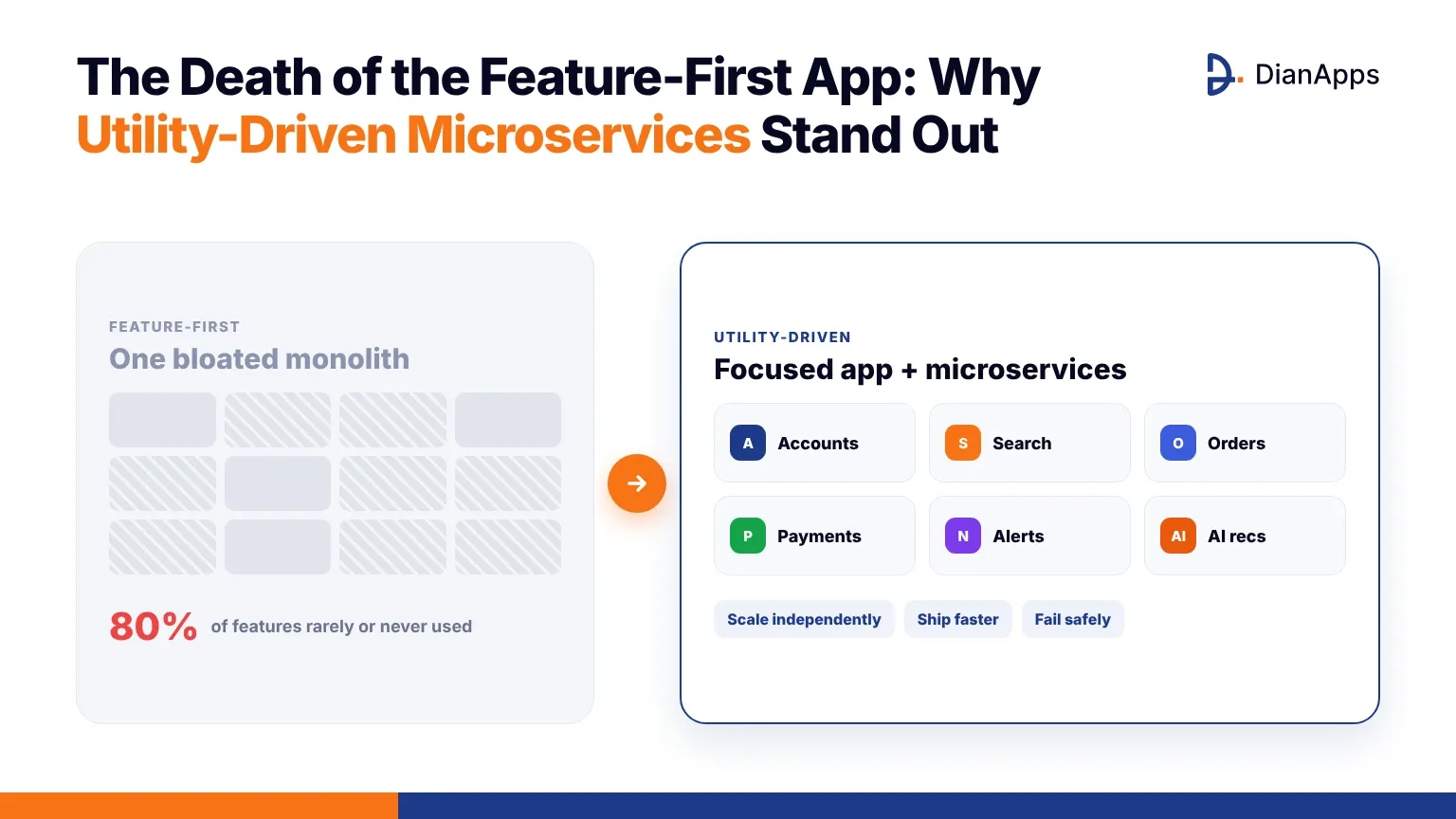
Quick answer: Feature-first apps try to win by adding more and more features, but most of those features go unused and make the app slower, harder to maintain and more confusing. Utility-driven apps focus on solving a few user problems extremely well, and they’re usually built on microservices: small, independent backend services that each handle one job. This combination lets teams improve what users actually value, scale the busiest parts independently and ship updates faster.
For years, the playbook for many apps was simple: add more features than the competition. Every new release came with another tab, another setting or another “nice-to-have.” Roadmaps were judged by how many features shipped.
The data tells a different story. Pendo’s Feature Adoption Report found that 80% of features in the average software product are rarely or never used (Pendo via PR Newswire). Each unused feature still has to be built, tested, secured and maintained, and it still adds weight to the app.
Users have also changed. They expect apps to be fast, simple and genuinely useful. They uninstall apps that feel bloated or slow, and app stores reward quality over quantity. This is why the feature-first app is fading, and why utility-driven products built on microservices are taking its place.
What Is a Feature-First App?
A feature-first app is built around adding as many capabilities as possible. Success is measured by features shipped, not by problems solved.
Common signs include:
- Crowded navigation with many rarely used sections
- Long release cycles because every change touches everything
- One large backend (a monolith) that’s risky to update
- Slow app startup and growing app size
- Teams constantly fixing bugs in old features instead of improving core ones
What Is a Utility-Driven App?
A utility-driven app starts with the user’s most important jobs and makes them as fast and easy as possible. Every feature must earn its place by solving a real problem.
Utility-driven products:
- Focus on a small number of core user journeys
- Measure success through task completion, retention and satisfaction
- Remove or hide features people don’t use
- Improve core experiences continuously based on data
- Use architecture that lets each capability evolve on its own
Feature-First vs Utility-Driven: A Quick Comparison
Feature-first appUtility-driven appGoalShip more featuresSolve core problems betterSuccess metricFeatures releasedTask completion, retention, satisfactionArchitectureUsually a monolithUsually microservices with modular app codeRelease speedSlow; changes affect everythingFast; services update independentlyScalingScale the whole systemScale only busy servicesUser experienceCrowded, slowerFocused, fasterMaintenance costGrows with every featureFocused on what users valueWhy Are Microservices the Backbone of Utility-Driven Apps?
Microservices split a backend into small, independent services, each responsible for one business capability, such as user accounts, payments, search, notifications or orders. Each service has its own code, data and deployment, and services talk to each other through APIs or events.
Here’s why this fits utility-driven products so well.
1. Teams can improve what matters most, fast
If search is the most-used feature, the search team can improve and release it several times a week, without waiting for the rest of the app or risking unrelated features.
2. You scale only what’s busy
During a sale, checkout and payments may need ten times more capacity, while profile settings barely change. Microservices let you scale those services alone, which is far cheaper than scaling the whole system. Cloud-native platforms make this easier: the CNCF’s 2025 Annual Cloud Native Survey found 82% of organisations run Kubernetes in production (CNCF, January 2026).
3. Failures stay contained
If the recommendations service fails, users can still log in, search and pay. Good microservices design uses timeouts, fallbacks and circuit breakers so one problem doesn’t take down the whole app.
4. Removing features becomes easy
In a monolith, deleting a feature can break hidden dependencies. With microservices, an unused capability can be switched off and retired cleanly, which keeps the product lean.
5. Each service can use the right technology
A search service might use a search engine, payments a strongly consistent database, and analytics a data warehouse. Teams choose what works best for each job.
6. It supports AI and personalisation
Modern apps add AI features like recommendations, smart search and assistants. These fit naturally as separate services that can be updated or swapped without touching the core app.
How Does This Change the Mobile App Itself?
Microservices live on the backend, but utility-driven thinking also shapes the app:
- Modular app code. Features are built as separate modules, so teams can work in parallel and remove features cleanly.
- Backend-for-frontend (BFF). A thin layer gathers data from several microservices and returns exactly what each screen needs in one request, which keeps the app fast on mobile networks.
- Feature flags. Teams test features with small groups of users and turn off anything that doesn’t add value.
- Micro-frontends and mini-apps. Some large apps go further and let teams own entire sections of the app. This look at Flutter vs React Native for micro-frontend architecture explains how that works in enterprise apps.
- Lighter apps. Fewer unused features mean smaller downloads, faster startup and better performance on budget phones, which is essential for android application development in fast-growing markets.
Are Microservices Always the Right Choice?
No. Microservices add complexity: more services to deploy, monitor and secure, and more network calls between them. They make the most sense when:
- Your app has several distinct capabilities with different scaling needs
- Multiple teams work on the product at the same time
- You need to release features independently and frequently
- Your user base is growing quickly
For a new product, a modular monolith is often the smarter start. You keep one deployable backend but organise code into clear modules that can be split into services later. Many successful apps begin this way and move to microservices as they grow.
StageRecommended approachIdea and MVPSimple, modular monolith; focus on the core utilityProduct-market fitSplit out services under the most pressure (payments, search)Rapid growthMicroservices for key capabilities, BFF layer, strong DevOpsEnterprise scaleMature microservices, platform team, full observabilityIf you’re at the early stage, this guide to what an MVP is in app development shows how to launch with the core utility first.
How Do You Build a Utility-Driven App With Microservices?
- Identify core user jobs. Use research and analytics to find the three to five tasks users care about most.
- Audit existing features. Measure usage and decide what to improve, merge or remove.
- Map business capabilities. Group features into clear domains, such as accounts, catalog, orders and payments.
- Start modular. Organise app and backend code around those domains.
- Split services gradually. Move high-traffic or fast-changing capabilities into their own services first.
- Add a BFF or API gateway to keep the mobile app simple and fast.
- Invest in DevOps. Use CI/CD, containers, monitoring, logging and tracing from the start.
- Measure utility, not output. Track task completion, retention, app performance and satisfaction.
- Keep pruning. Review feature usage every quarter and retire what users don’t need.
What Should You Look for in a Development Partner?
Moving from feature-first to utility-driven needs product thinking as much as engineering. When choosing a mobile app development company or app development agency, look for a team that:
- Starts with discovery and user research, not a feature list
- Offers end-to-end mobile app development services, from UX and custom mobile app development to backend, cloud and maintenance
- Has real experience designing microservices and modular app architectures
- Builds strong android app development and iOS experiences for every device range
- Measures outcomes like retention and performance after launch
Many businesses combine a partner’s application development services with their own team, or hire mobile app developers with specific microservices, cloud or Android skills. Experienced mobile app developers who understand both product and architecture make the biggest difference. If you’re starting fresh, focused MVP development services help you launch the core utility quickly; if you’re scaling, complete mobile app development services cover architecture, apps and cloud together; and if Android is your main market, you can hire Android developers with experience optimising for a wide range of devices.
Frequently Asked Questions
What is a utility-driven app?
A utility-driven app focuses on solving a few important user problems as quickly and simply as possible. Instead of adding many features, it improves core journeys based on data and removes features people rarely use.
Why are feature-first apps losing users?
They often become slow, crowded and hard to use. Pendo found that 80% of features in typical software products are rarely or never used, yet each one adds maintenance cost, complexity and weight to the app.
What are microservices in mobile app development?
Microservices split an app’s backend into small, independent services, such as accounts, payments, search and notifications. Each service can be developed, deployed and scaled separately, which makes updates faster and failures easier to contain.
Should a startup use microservices?
Usually not at first. A modular monolith is simpler and cheaper for an MVP. Startups can split the busiest or fastest-changing parts into microservices once they find product-market fit and their team and traffic grow.
How do microservices improve app performance?
They let you scale only the busiest services, keep failures contained and release improvements faster. Combined with a backend-for-frontend layer that sends each screen exactly the data it needs, they help mobile apps stay fast as they grow.
Conclusion
The era of winning by feature count is ending. Users reward apps that solve their problems quickly and reliably, not apps that do everything poorly. Utility-driven products focus on what matters, prune what doesn’t and keep improving the core experience.
Microservices give these products the structure to move fast: independent services, targeted scaling, contained failures and clean ways to add or remove capabilities. Start with the core utility, build modularly, split services as you grow and measure success by the value users get. That’s how modern mobile application development stands out in a crowded app store.