
As you already know, it's tough to manage everything your business’s digital properties do and have them communicate effectively. In most cases: You will set up one attractive website but your team is struggling to transfer those leads over to somewhere manually, Page-loading speed time is agonizingly slow and the reporting on analytics you are looking for doesn’t add up to your sales figures. Disconnected elements and scattered tools make your online experience suffer and lead to a week being burnt on inefficient admin on the part of the team that works around the board.
Unlocking true operational efficiency requires turning your website into an automated data hub.
In this guide, you will learn how native and third-party webflow integrations transform static websites into dynamic, data-driven platforms. We will cover how integrating the right tools improves site performance, streamlines lead collection, elevates analytics accuracy, and keeps your entire marketing ecosystem running at peak performance.
Why Modern Web Architecture Demands Deep Integration
Building a high-performing site is no longer just about visual layouts and responsive typography. Today’s web users expect instant page loads, personalized content journeys, and real-time responses to their inquiries. Meeting these demands manually is impossible at scale.
When you seamlessly connect your site to specialized tools, you delegate heavy lifting to dedicated servers designed specifically for those tasks. Rather than overloading your site with heavy databases or third-party plugins that drag down performance, direct API connections allow your platform to remain lean, fast, and secure.

1. High-Velocity Lead Management and CRM Syncing
A contact form should never sit in a digital vacuum. Integrating your site directly with customer relationship platforms like HubSpot, Salesforce, or Airtable ensures that incoming leads trigger immediate action.
By integrating your website directly to niche solutions you make specialized servers do the heavy lifting required for those specific functions. Allowing them to process data, rather than your website handling enormous databases or third-party plugins that bog your website down. You should have a streamlined website that’s fast and secure via direct API integrations.
2. Advanced Analytics and Accurate Data Tracking
Today it’s increasingly difficult to track reliable visitor interactions due to changing privacy regulations and adblockers, but true data relies on a more server-side analytics process. Direct integration to Google Analytics 4, Segment, or using conversion APIs allow you to collect exact user data while still respecting privacy on the front-end of your site. This helps to understand exactly which landing pages have turned into money, where the friction points are, and where your spend is being utilized.
3. Automated Content Operations and Dynamic CMS Feeds
For businesses publishing large amounts of content and making routine changes to their site,manual CMS updates can be an operational nightmare. Syncing externally sourced data into your CMS through API integration means an automatic site update will occur whenever the data changes.
From real-time inventory counts to automated podcast feed integration or real estate listing feeds, API integrations bring an almost instantly updated website. You can eliminate duplicate data entry, avoid human error, and increase your search engine presence by always having fresh content.
4. Takeaways from the most influential digital platforms on Tech Stacks
Look at most top advertising agency websites you can easily spot a consistent trend. High-performing agencies do not build slow and cluttered sites full of duplicate scripts but rather pair great front-end designs with extremely lightweight and powerful integration stacks.
By offloading complex tasks—such as video hosting, client portal management, and interactive forms—to specialized external applications, these agency platforms maintain blazingly fast Core Web Vitals scores. Fast load speeds directly lower visitor bounce rates, improve organic search engine rankings, and provide a polished, friction-free experience for prospective clients.
Adopting this lean, agency-level approach allows your business to offer sophisticated user experiences without compromising baseline speed or accessibility.
Weighing the Trade-Offs: Pros, Cons, and Key FAQs

Connecting external software to your site delivers immense value, but it requires careful strategic planning to execute correctly. Reviewing the benefits alongside potential pitfalls ensures your team makes informed tech stack investments.
Pros of Integrated Web Architecture
- Blazing Fast Performance: Offloading complex database logic to specialized external software keeps front-end code clean, responsive, and lightweight.
- Streamlined Operational Workflows: Eliminates manual data entry by automatically routing leads, form submissions, and customer data directly to your internal tools.
- Higher Data Accuracy: Server-side event tracking provides clear insights into user behavior without relying on buggy client-side scripts.
- Endless Scalability: Add or swap out backend business tools like CRMs, payment gateways, and email providers without rebuilding your front-end store or site.
Cons of Integrated Web Architecture
- Initial Setup Effort: Building out custom webhooks, REST APIs, and authentication tokens involves the technical aptitude most drag and drop page builders simply won’t let your users exercise easily.
- Ongoing: External API rate limits: If you're using a whole lot of external integrations to handle your syncs, you’re dependent on how much load any single one vendor can handle.
- Third Party API Maintenance: Providers often cycle through API changes, so be aware that they’ll likely take some development effort to stay compatible.
Frequently Asked Questions
Will the external integrations slow my site down?
When implemented properly, No! Because the webhooks are making use of the native webhooks provided by the platform and use of asynchronous service calls will process the information in the background.
Is coding needed to integrate Webflow?
Not necessarily.
While complex custom setups rely on the native Apis and custom webhooks for integration, a variety of robust integration connections can be readily made with drag and drop integration tools like Make or Zapier.
How do integrated platforms handle user privacy compliance?Using direct server-side data connections gives you total control over what customer data is sent to external tools, making GDPR and CCPA compliance easier to manage.
Building a Fast, Data-Driven Platform
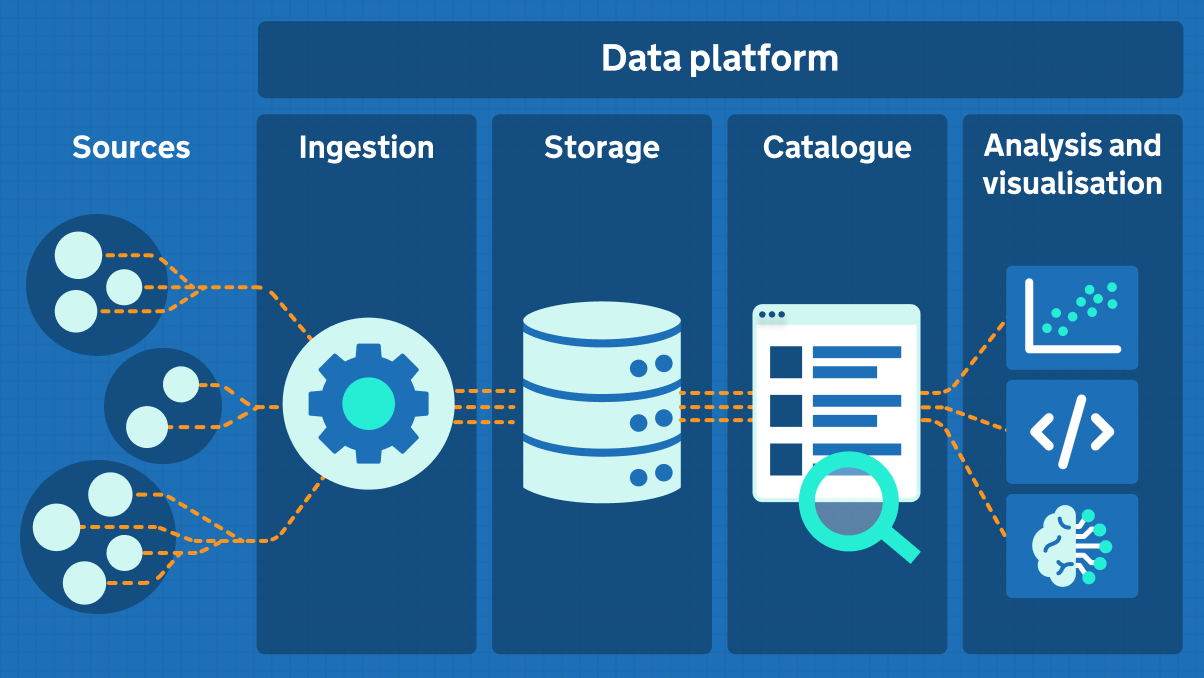
It's about moving beyond pretty websites - and beyond the limitations - to build an operational, digitally optimized infrastructure that never sleep, and is hard at work for you. Integratingsite to the relevant data tools, performance scripts, CRMs, etc, automatically handles back-end administrative processes and ensures the blink-of-an-eye load speed required of any modern digital platform that customers and search engines expect . As a foundation designed for scalable growth, a clean architecture built for seamless integration, automation, and measurement allows the challenging and sometimes daunting task of growing your brand and increasing its digital reach a concrete path to success, rather than an obstacle.