A small service company runs on a few moving parts. Someone books the job. Someone picks the technician. Someone checks that the part is on the truck. Later, someone sends the bill. When one step slips, the customer notices first.
People now expect quick, accurate answers. They want to know who is coming, when, and whether the work is covered. That is hard to promise when records live in notebooks, spreadsheets, and text threads.
This is where field service software for small business teams earns its place. It keeps jobs, people, parts, and paperwork in one system, so fewer details fall through the cracks.
Where Small Teams Lose Time
Most delays come from small, repeated tasks:
- Phone calls back and forth to assign work
- Technicians calling the office for job history
- Parts that turn out to be missing on site
- Paper timesheets and forms that arrive late
- Invoices sent days after the job ends
None of these looks serious alone. Together they cut the number of jobs a crew can finish in a day, and they leave customers waiting.
How Field Force Tracker Speeds Up Daily Work
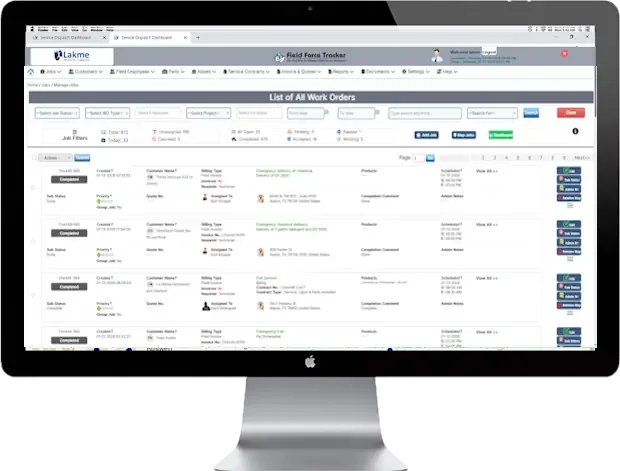
Scheduling comes first. Dispatchers can see which technicians are free, pick the right person, and send the job details right away. Jobs move on a drag-and-drop calendar when plans change. Technicians get an alert when work is assigned, and map support helps with route choices. The company notes that automated scheduling gives dispatchers more time to handle emergencies.
The mobile app does much of the rest. It runs on iPhone and Android, on phones and tablets. In the field, a technician can:
- Open the work order, customer history, and equipment repair history
- Add photos, notes, and diagnostic details
- Complete checklists and forms on site
- Capture customer signatures
- Build a quote, create an invoice, and take payment
- Clock in and out for the day
Signal can drop on a job site. Job and scheduling data can still be viewed without Wi-Fi or cell service, and edits to notes or photos wait until the phone reconnects. Inventory levels and live payments do need a connection.
Parts are tracked too. Teams can scan barcodes or add items by hand, so they know what is in stock before a technician leaves. Hours logged in the app give the office a clear weekly record without paper timesheets.
How the Same Tools Improve Customer Satisfaction
Better preparation leads to better visits. When a technician can see repair history, parts availability, and product details, the work is more likely to be finished on the first visit. That saves time for both sides. Preventive maintenance can also reduce the need for another service call.
Coverage questions get easier, too. Service contracts and warranty records sit under the right customer, so the team knows right away what is included. Customers also get their own portal login to check past jobs, view invoices, download paperwork, and pay what they owe.
What Field Force Tracker Adds for HVAC Teams
For heating and cooling work, Field Force Tracker’s HVAC software brings tools built around the trade:
- Good, Better, Best quotes for new system installs
- Service agreements and membership plans, with renewals tracked
- Preventive maintenance and inspection schedules
- Recurring jobs that send reminders to staff and customers
- Serialized parts tracking for warranty management
- QuickBooks, Xero, and Sage integrations
One plumbing and heating company in New Jersey said its dispatchers could now schedule jobs without the costly mix-ups that had been losing it customers. The company behind the product has operated for more than 17 years and serves customers in more than 30 countries.
Summary
Productivity and customer satisfaction grow from the same habit: clear information, shared on time. Scheduling, mobile job details, parts tracking, and a customer portal helps small teams finish more work and keep customers informed.
Field Force Tracker offers a free 14-day trial or a demo, so you can test it on your own jobs before you decide.